Accounts Reconciliation
 Financial Spreading
 Digital Archive
 SchematicIQ
 Loan Ops
 Docutwin
 Contract intelligence
 KYC/KYB
 Form Processing
 Investment Statements
 Enterprise Knowledge
Agent
 Realtime Intelligence
 Customer Support 360
 Analytica
 CreditIQ
 City Intelligence
 Smart Utilities
 Connected Worker & Assets
 Drone Based Infra Monitoring
 SceneTrack






Key Takeaways
- Invoice digitization converts invoices into structured, usable data.
- OCR reads characters; AI interprets fields and document context.
- Validation determines whether captured data is transaction-ready.
- Automated routing reduces repetitive AP work.
- Human review remains essential for uncertain or high-risk exceptions.
- ERP acknowledgement confirms whether an invoice posted successfully.
- Performance should be measured across accuracy, cost, speed, and control.
Accounts payable teams continue to lose substantial hours each week to a document whose structure has remained largely unchanged for decades: the invoice. Whether it arrives as a PDF attachment, a scanned image, or a paper copy submitted in person, it still requires a team member to read it, key the data into an ERP system, and hope nothing was entered incorrectly. Invoice digitization eliminates this manual bottleneck by introducing a structured, auditable process, and understanding precisely how that process works separates a tool selected merely to satisfy a compliance requirement from one that enables an accounts payable function to scale without proportional headcount growth.
This guide examines what invoice digitization entails, how the underlying process functions at each stage, why organizations are prioritizing it, and how to implement and measure it effectively.
What Is Invoice Digitization and How Is It Different From Related Processes?
Invoice digitization converts the commercial and accounting information contained in an invoice into defined data fields. These fields can then be searched, validated, matched, approved, analyzed, and transferred to an enterprise resource planning (ERP) or accounting system.
Digitizing invoices may include recognizing the document type, identifying the supplier, extracting invoice-level and line-level values, interpreting tables, normalizing dates and currencies, and connecting the captured data with purchase orders, goods receipts, contracts, and vendor master records.
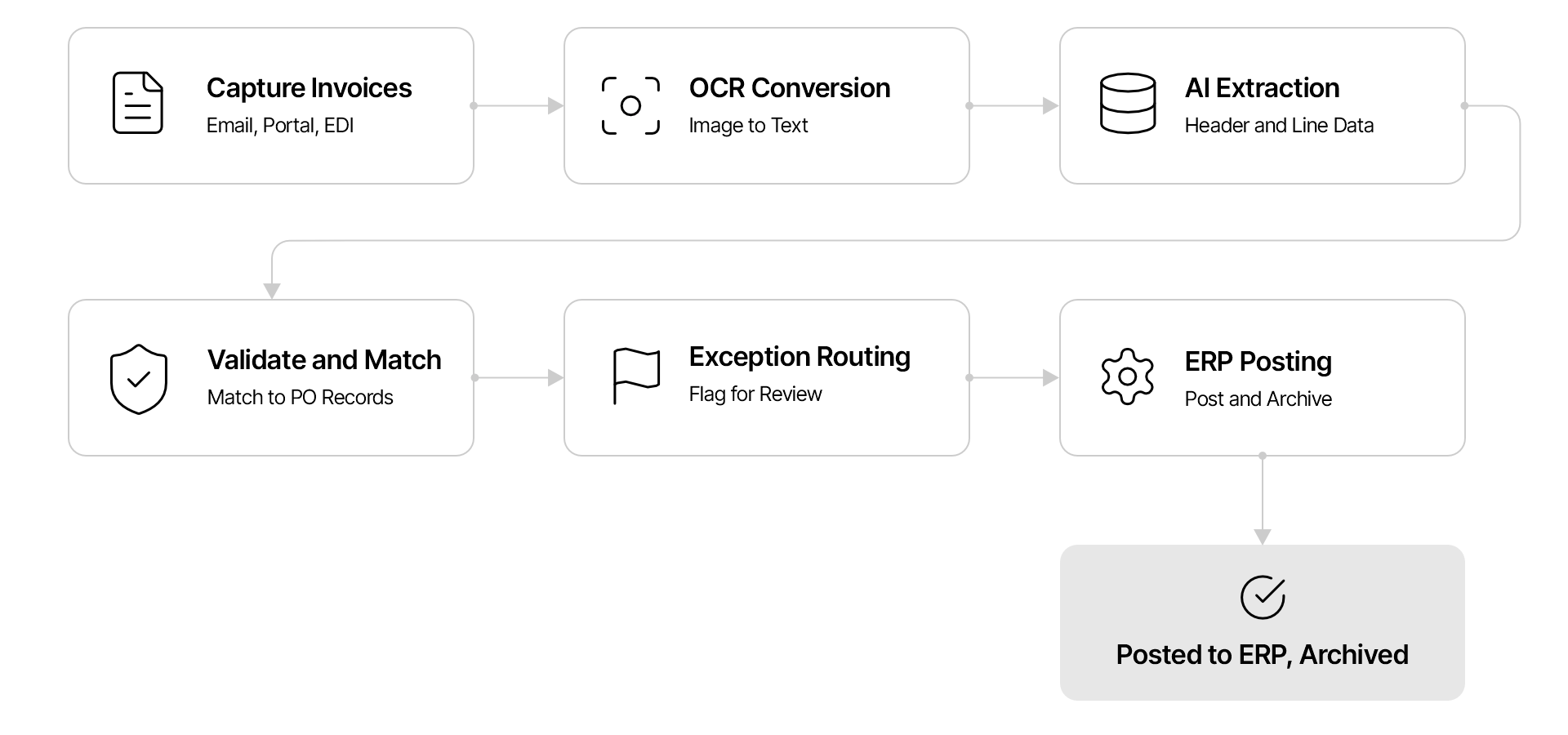
Invoice Digitization and Its Role in Accounts Payable
Invoice digitization establishes the data foundation for automated AP processing. Before an invoice can be matched, approved, posted, or paid, its contents must be available in a structured and reliable form.
In a manual workflow, AP personnel receive invoices, determine what each document contains, key the data into an ERP, check it against internal records, and send it to the appropriate approver. Digitization moves much of this preliminary work into a controlled system. AP teams can then concentrate on exceptions, policy decisions, and supplier issues instead of repetitive data entry.
Its role typically extends across the following activities:
- Consolidating invoices from email, portals, scans, shared folders, electronic data interchange (EDI), and other channels
- Separating invoices from unrelated attachments or supporting documents
- Capturing invoice data at header and line-item levels
- Checking whether required fields are present and correctly formatted
- Matching invoice values with purchase orders, receipts, contracts, or previous transactions
- Routing valid invoices and directing exceptions to the appropriate reviewer
- Creating a searchable record of the source document, extracted data, validations, and actions
Invoice digitization is therefore an enabling layer within AP, not the entire AP function. It prepares invoice data for the downstream controls that determine whether a transaction should be approved, posted, and paid.
To understand how these capabilities operate within the wider invoice-to-payment cycle, see this guide to invoice processing in accounts payable.
Invoice Data Captured From Headers, Line Items, and Supporting Documents
The required extraction schema depends on the organization, invoice type, industry, and ERP configuration. Most implementations capture three categories of information.
Header-level data identifies the invoice and the parties to the transaction. Common fields include:
- Supplier name, address, tax registration number, and bank details
- Buyer or legal entity name
- Invoice number, invoice date, due date, and payment terms
- Purchase order or contract reference
- Currency, subtotal, tax, freight, discount, and total amount
Line-item data explains what was purchased and how the total was calculated. It may include descriptions, product or service codes, quantities, units of measure, unit prices, tax rates, discounts, cost centers, general ledger codes, and individual line totals.
Supporting-document data provides context needed to validate the invoice. Delivery notes, receipts, purchase orders, statements of work, timesheets, and credit notes may contain references or values that must be connected to the invoice before it can proceed.
Line-item extraction is usually more demanding than header extraction because tables vary widely. Columns may be missing, repeated across pages, nested, misaligned, or labelled differently by each supplier. A capable system must preserve the relationship between descriptions, quantities, rates, taxes, and totals rather than treating every recognized value as isolated text.
Invoice Digitization vs Scanning, OCR, Digital Invoices, E-Invoicing, and AP Automation
Several related terms are used interchangeably, although they describe different functions.
| Term | Primary Function | Typical Output |
| Invoice scanning | Creates an image of a paper invoice | Image or PDF file |
| OCR | Converts visible characters into machine-readable text | Text and coordinates |
| Invoice digitization | Extracts, structures, normalizes, and validates invoice data | Defined transaction fields and source document |
| Digital invoice | Refers to an invoice created or stored in a digital format | PDF, spreadsheet, portal record, or other electronic file |
| E-invoicing | Exchanges invoices in a prescribed structured electronic format | XML, JSON, EDI, or country-specific schema |
| AP automation | Coordinates the broader invoice-to-payment workflow | Captured, matched, approved, posted, and payment-ready transactions |
Scanning alone makes a document easier to store but does not make its contents operationally usable. OCR recognizes characters, yet it may not understand that one number represents an invoice total while another represents a tax amount. Invoice digitization adds document understanding, data structure, validation, and workflow context.
E-invoices are already structured when they comply with the required schema, so they may not need OCR. However, their fields still need to be validated and mapped to internal systems. AP automation covers a wider process that can include invoice digitization as well as approvals, exception management, posting, payment scheduling, and reporting.
How Does Invoice Digitization Work?
Invoice digitization through AI follows a controlled sequence from document receipt to ERP posting. The exact configuration varies, but a production workflow generally includes the following six stages.
Step 1: Capture and Prepare Invoices From Different Submission Channels
The capture layer brings invoices into a common processing queue while retaining relevant metadata such as sender, arrival time, file name, and source channel.
Invoices arrive through dedicated email inboxes, supplier portals, scanners, mobile uploads, shared folders, EDI connections, APIs, or cloud storage
Preparation can involve splitting a batch into separate documents, joining pages that belong to the same invoice, rotating images, removing blank pages, improving contrast, reducing noise, and checking file integrity. The system must also distinguish invoices from purchase orders, delivery receipts, tax certificates, and unrelated correspondence.
This stage has a direct effect on downstream accuracy. If two invoices are incorrectly combined, an attachment is omitted, or a page is assigned to the wrong document, even accurate field extraction will produce an invalid transaction.
Step 2: Convert Invoice Content Into Machine-Readable Text Using OCR
OCR detects printed or handwritten characters and converts them into text. It also records spatial information, such as the location of words, lines, and blocks on the page. This spatial context helps later models determine whether a value belongs to the invoice header, an address block, a summary section, or a table.
Image quality, resolution, font size, language, page orientation, stamps, handwriting, and background patterns can all affect recognition. Preprocessing improves readability, but OCR confidence alone is not sufficient to determine whether the correct business field was captured.
For example, OCR may correctly recognize several dates and amounts on a page. A separate interpretation layer must identify which date is the invoice date and which amount is the amount due.
Step 3: Classify Documents and Extract Header and Line-Item Data Using AI
AI models classify each document and interpret the text, layout, tables, and visual relationships within it. Rather than depending exclusively on fixed templates, AI-based invoice digitization can recognize fields across supplier-specific formats and identify semantically equivalent labels such as “Invoice No.,” “Document Number,” or “Bill Reference.”
The system then maps relevant values to a defined schema. It may also associate table headers with values across multiple rows or pages, detect repeated headers, distinguish subtotals from final totals, and connect supporting documents to the primary invoice.
Each extracted field should carry provenance and confidence information. Provenance connects a field to its exact location in the source document, while the confidence score indicates the model’s certainty. Together, they allow reviewers to verify questionable values efficiently without rereading the entire document.
Step 4: Standardize, Validate, and Match Invoice Data With Business Records
Extracted data must be normalized before it can be reliably compared or posted. Dates may need a common format, supplier names may need to be mapped to vendor IDs, currencies and decimal separators must be standardized, and units of measure may need to align with ERP conventions.
Validation then evaluates the transaction against mathematical, master-data, and policy rules. Typical checks include:
- Recalculating line totals, taxes, discounts, and invoice totals
- Confirming that mandatory fields are present
- Comparing supplier details with approved vendor master records
- Checking invoice numbers against prior transactions for possible duplicates
- Verifying purchase order values, quantities, prices, and tolerances
- Comparing invoiced quantities with goods or service receipts
- Applying contract terms, tax rules, and organizational approval policies
For purchase-order invoices, the process may perform two-way matching between the invoice and purchase order or three-way matching among the invoice, purchase order, and receipt. Non-PO invoices may require coding, contract validation, or cost-center assignment before approval.
Step 5: Route Approvals and Low-Confidence Exceptions for Review
Invoices that satisfy extraction, validation, and matching criteria can move directly to the next workflow stage. Those that fail a rule or contain uncertain values should be routed to a reviewer with the relevant evidence and exception reason.
Routing logic can consider invoice value, business unit, supplier, expense category, purchase order status, risk indicators, and reviewer authority. A minor discrepancy within an approved tolerance may proceed automatically, while a bank-account change or high-value mismatch may require enhanced review.
Effective exception handling is specific. Instead of asking an analyst to “check the invoice,” the workflow should identify the affected field, display the source location, explain the failed control, and provide the related purchase order or master-data value. This reduces review time and improves the consistency of decisions.
Step 6: Transfer Validated Data to ERP Systems and Archive the Invoice
Once the invoice has passed the required controls and approvals, the structured data is mapped to the target ERP or accounting system. The transfer may occur through APIs, integration middleware, robotic process automation, or scheduled file exchange.
Successful transmission is not the same as successful posting. A reliable workflow should capture the ERP response, confirm that the transaction was accepted, record the generated document or voucher number, and route rejected records back for resolution.
The invoice, extracted fields, supporting evidence, approval history, validation results, and posting acknowledgement should then be retained according to the organization’s record-management policy. This creates a traceable transaction history for audits, supplier inquiries, and future analysis.
Organizations that need these capabilities across capture, validation, matching, approvals, ERP integration, and exception management can evaluate automated invoice processing software as the operational layer that extends digitized data into the broader invoice-to-pay workflow.
Manual invoice processing is costing you more than you think.
See how Collatio automates capture, validation, and ERP posting.
Book a free demoWhy Do Businesses Digitize Invoices?
Organizations digitize invoices to improve the speed, capacity, accuracy, and control of AP operations. The value is greatest when structured data is used to reduce avoidable manual work without weakening financial controls.
1. Faster Processing, Lower Costs, and Greater Touchless Capacity
Manual invoice entry consumes time at the beginning of every AP workflow. Automated capture and validation allow teams to process higher volumes without increasing headcount at the same rate. They also reduce the time invoices spend waiting in shared inboxes or being transferred between employees.
Industry benchmarks illustrate the operational case for digitization. Ardent Partners reported that the average AP organization spends $9.40 to process one invoice and takes 9.2 days to process it. The same research connects lengthy approval times with opportunities to digitize more invoices and improve processing speed. (Ardent Partners)
Touchless processing becomes possible when an invoice is captured correctly, passes all validations and matching rules, receives any required automated or policy-based approval, and posts successfully without manual handling. The goal should not be touchless processing at any cost. It should be touchless processing for transactions that meet clearly defined control conditions.
2. Fewer Data Entry Errors, Duplicate Payments, and Processing Exceptions
Manual keying can introduce transposed digits, incorrect dates, misplaced decimals, incomplete line items, and inconsistent supplier information. Digitization applies the same extraction schema and validation rules to every invoice, making errors easier to detect before posting.
Duplicate checks can compare invoice numbers, supplier identities, dates, amounts, purchase order references, and document similarities. This matters because duplicates do not always arrive as identical files. A supplier may resend an invoice with a modified file name, altered formatting, or slightly different reference punctuation.
Digitization does not eliminate exceptions, but it can prevent avoidable ones and present legitimate discrepancies with better context.
3. Improved AP Visibility, Cash Flow Forecasting, and Supplier Payments
Paper documents and email attachments provide limited operational visibility. Structured invoice data makes it possible to see invoice volumes, values, statuses, due dates, bottlenecks, and liabilities before invoices are posted or paid.
Finance teams can use this information to improve cash flow forecasts, plan payment runs, capture early-payment discounts, and avoid late-payment penalties. AP managers can identify where invoices are delayed, which suppliers generate the most exceptions, and which business units have recurring approval issues.
Suppliers also receive more reliable status information because invoices can be traced from receipt through validation, approval, posting, and payment preparation.
4. Stronger Compliance, Fraud Controls, Audit Trails, and Record Retrieval
A controlled digital workflow applies validation and approval requirements consistently. It can enforce segregation of duties, authorization limits, tax checks, vendor controls, and document-retention rules while logging every action.
Digitized invoice records support:
- Faster retrieval of invoices and supporting documents
- Evidence of who reviewed, changed, approved, or rejected a transaction
- Detection of altered bank details, unusual payment instructions, or inconsistent supplier information
- Consistent retention and access policies
- Reperformance of matching and validation decisions during an audit
Digitization strengthens controls only when access, rules, changes, and exceptions are governed. Automating an incomplete or poorly designed control can make an error occur faster and at greater scale.
How to Implement and Measure Invoice Digitization
Implementation should be treated as a data and control transformation rather than a standalone OCR deployment. The system must work with real document variability, AP policies, master data, ERP structures, and review responsibilities.
1. Assess Invoice Sources, Formats, Volumes, Quality, and Existing Workflows
Begin by profiling the actual invoice population. Identify submission channels, file types, languages, page counts, supplier concentration, purchase-order coverage, line-item complexity, scan quality, handwritten content, and seasonal volume changes.
Map the current workflow from receipt to posting. Record where data is entered, which checks are performed, what causes exceptions, how approvals are assigned, and which systems hold the relevant records. This baseline prevents the new process from reproducing unnecessary manual steps in digital form.
A representative test set should include common invoices as well as difficult cases: multipage tables, credit notes, utility invoices, poor scans, invoices with missing purchase order references, mixed document packets, and previously duplicated submissions.
2. Configure Extraction Fields, Validation Rules, and Confidence Thresholds
Define which fields are required for each invoice type and target system. Avoid extracting every visible value simply because it is available. Each field should have a business purpose, validation method, data owner, and downstream destination.
Configure mathematical checks, vendor validations, duplicate logic, matching tolerances, and approval rules. Confidence thresholds should be set at field or risk-category level where possible. A low-value description field and a supplier bank account should not necessarily use the same automation threshold.
Thresholds should be calibrated with representative production data and adjusted based on false acceptances, false rejections, and operational risk, rather than chosen solely to maximize automation rates.
3. Distinguish Recognition Accuracy From Transaction Validity
One of the most important implementation distinctions is the difference between reading a document correctly and determining that its transaction is valid.
An extraction model can correctly read an invoice total of $18,500, but the amount may still exceed the purchase order. It can accurately capture a bank account that was fraudulently changed. It can identify an invoice number that already exists in the ERP.
Organizations should therefore assess multiple layers separately:
- OCR accuracy: Were the characters recognized correctly?
- Field extraction accuracy: Was the correct value mapped to the correct field?
- Document completeness: Were all pages, attachments, and line items captured?
- Business-rule validity: Does the transaction comply with mathematical, master-data, tax, and policy controls?
- Posting validity: Was the accepted data mapped and recorded correctly in the target system?
This separation prevents a high extraction-accuracy figure from being mistaken for end-to-end process reliability.
4. Apply Human Review to Low-Confidence and High-Risk Exceptions
Human review should be targeted rather than applied uniformly. Low-confidence fields, conflicting values, missing references, tolerance failures, unusual supplier changes, and high-value transactions may warrant intervention.
Review screens should show the source document beside the extracted data, highlight the relevant evidence, and explain why the item was routed. Corrections should be logged with the original value, revised value, reviewer identity, and timestamp.
Not every correction should automatically retrain a model. Reviewer errors, temporary business rules, and supplier-specific anomalies can contaminate feedback data. Training inputs require quality checks and governance before they are used to update extraction behavior.
5. Treat Confidence Scores as Routing Signals, Not Proof of Accuracy
A confidence score is a model-generated estimate, not an independent confirmation that a value is correct. High-confidence predictions can still be wrong, particularly when a document resembles a familiar layout but assigns different meanings to similar fields.
Confidence should therefore influence routing alongside business risk and validation results. For example, a high-confidence total that fails a purchase-order tolerance should still be reviewed. Conversely, a moderately confident non-financial description may not need to stop an otherwise valid low-risk invoice.
Well-designed controls combine three questions: How certain is the extraction? Did the data pass independent validation? What would be the impact if it were wrong?
6. Test ERP Mapping, Data Transfer, Posting Acknowledgements, and Access Controls
End-to-end testing must go beyond confirming that data leaves the digitization platform. Verify field mappings, supplier and entity identifiers, general ledger codes, tax treatment, character limits, date formats, currencies, duplicate controls, and attachment transfer in the target ERP.
Test both successful and failed posting scenarios. The workflow should capture rejection messages, prevent silent data loss, support controlled retries, and avoid creating duplicates after a timeout or integration failure.
Access testing should confirm that users can view and change only the data permitted by their role. Configuration changes to extraction models, validation rules, confidence thresholds, vendor details, and approval workflows should be authorized and logged.
7. Measure Accuracy, Touchless Processing, Exceptions, Cycle Time, Cost, and Posting Success
No single metric describes the performance of invoice digitization. A balanced measurement framework should include:
- Field-level extraction accuracy, weighted by business importance
- Header and line-item completeness
- First-pass validation and match rate
- Touchless processing rate under approved control conditions
- Exception rate by supplier, document type, field, and cause
- False acceptance and false rejection rates
- Average receipt-to-posting and receipt-to-approval cycle time
- Manual review time per invoice and per exception
- Processing cost per invoice
- ERP posting acceptance, rejection, and retry rates
- Duplicate prevention and recovery of policy or tax discrepancies
Metrics should be segmented. A strong overall average can conceal poor performance for a high-value supplier, a specific business unit, or complex multipage invoices.
8. Monitor Template Drift and Feedback Quality After Go-Live
Invoice digitization performance can change even when the software configuration remains constant. Suppliers revise layouts, tax rules change, business units adopt new purchase processes, and ERP master data evolves. This creates document and process drift.
Teams should monitor changes in field confidence, exception causes, reviewer corrections, supplier formats, and posting failures over time. Sudden shifts may indicate a new invoice layout, an upstream data problem, or a control that no longer reflects current policy.
Post-launch governance should include version control for models and rules, regression testing against representative invoices, approval for material configuration changes, and periodic review of the data used for model improvement. This turns digitization into a controlled operating capability rather than a one-time implementation.
The Overlooked Variable: Format Sprawl From Long Tail Suppliers
Most implementation guidance focuses on tuning the AI model, but a quieter problem tends to determine real world performance more than model quality: the sheer diversity of invoice formats coming from low volume, long tail suppliers. High volume vendors are worth training the system against directly, but the majority of unique formats an AP team encounters often come from suppliers sending only a handful of invoices a year, meaning the system rarely sees the same layout twice. Organizations that get the most out of digitization treat format governance as an ongoing discipline: tracking which suppliers can be nudged toward standardized submission (a portal or electronic invoicing channel) versus which will always require adaptive extraction, and revisiting that split periodically as the vendor base changes. Solutions evaluated only on how well they read a handful of sample invoices during a demo rarely reveal this problem; it only shows up months into production, once the long tail of vendors starts sending real documents.
Future Trends in Invoice Digitization
Invoice digitization is moving from isolated data capture toward systems that can interpret broader transaction context, detect changing patterns, and support continuous controls.
1. Adaptive AI for New Invoice Formats and Predictive Exception Resolution
Adaptive models will improve the ability to process previously unseen supplier layouts without requiring a new template for each variation. Multimodal AI can evaluate text, spatial relationships, tables, visual cues, and supporting documents together, which is especially useful for complex or inconsistent invoices.
Predictive exception handling may also identify the probable cause, responsible team, and recommended resolution based on prior outcomes. However, the value of this capability will depend on explainability and controlled feedback. Suggested actions should remain traceable to source evidence, business rules, and authorized historical decisions.
2. Continuous Compliance, Fraud Detection, and Processing Monitoring
Future workflows will evaluate compliance and risk throughout processing rather than relying primarily on periodic sampling. Systems can monitor changes in supplier details, invoice patterns, approver behavior, duplicate indicators, tax treatment, and payment instructions as transactions move through AP.
Continuous monitoring can also detect operational degradation, such as rising exceptions for a supplier or a decline in ERP posting success. This connects document intelligence with process control, allowing teams to intervene before isolated issues become systemic failures.
3. The Feedback Loop Competitors Rarely Mention: Corrections as Training Signal
There’s a structural advantage to AI based digitization that’s easy to miss when evaluating it purely as a data entry replacement: every human correction made during exception review is, itself, a labeled training example. A field that was misread and manually corrected doesn’t just fix that one invoice; in a well architected system, it feeds back into the extraction model, gradually reducing the exception rate for that vendor’s format over time.
This means digitization accuracy for a given vendor should trend upward the longer the relationship runs, not stay flat. Organizations evaluating vendors should specifically ask whether corrections are used to retrain or fine tune extraction models, and how quickly that improvement shows up, because a system that makes the same extraction mistake on the same vendor’s invoice every month isn’t actually learning, regardless of how sophisticated its initial accuracy claims are.
Conclusion: Building a Controlled Digital Invoice Workflow
Invoice digitization is not a single feature to switch on; it is a coordinated pipeline of capture, extraction, validation, and integration stages, each requiring deliberate configuration, rigorous testing, and ongoing measurement. Organizations that approach it as a governance and control mechanism, rather than a mere convenience, consistently realize compounding benefits: fewer processing errors, materially shorter cycle times, a stronger audit posture, and accounts payable teams empowered to focus on judgment intensive exceptions rather than routine data entry. The enterprises deriving the greatest value are not necessarily those deploying the most sophisticated AI model; they are the ones that assessed their invoice landscape with clear eyed honesty, calibrated validation rules to their genuine risk tolerance, and continued measuring performance well beyond go live rather than treating implementation as a finite, one time project.
This is precisely the discipline Scry AI brings to accounts payable through Collatio, its AI powered intelligent document processing platform, purpose built to turn invoice digitization from a one- time project into a continuously improving control.
Book a free demo with Scry AI today to see how Collatio can bring this same discipline to your accounts payable workflow.