Accounts Reconciliation
 Financial Spreading
 Digital Archive
 SchematicIQ
 Loan Ops
 Docutwin
 Contract intelligence
 KYC/KYB
 Form Processing
 Investment Statements
 Enterprise Knowledge
Agent
Enterprise Knowledge
Agent Realtime Intelligence
 Customer Support 360
 Analytica
 CreditIQ
 City Intelligence
 Smart Utilities
 Connected Worker & Assets
 Drone Based Infra Monitoring
 SceneTrack





Key Takeaways
- An AP workflow covers invoice receipt, validation, approval, payment, reconciliation, and retention.
- Clear ownership reduces missing invoices, approval delays, errors, and duplicate payments.
- PO, non-PO, recurring, and high-risk invoices require different workflow controls.
- Risk-based routing applies added checks to unusual, high-value, or sensitive transactions.
- Automation supports invoice capture, matching, approvals, exceptions, payment validation, and tracking.
- Human review remains necessary for exceptions, overrides, and high-risk payments.
- Key AP metrics include cycle time, exception rate, match rate, and payment accuracy.
An accounts payable workflow defines how an organization receives, validates, approves, pays, records, and retains supplier invoices. A well-structured workflow ensures that each invoice follows documented rules, responsible employees know what action is required, and finance teams can trace every transaction from invoice receipt through payment.
Weak workflows often lead to missing invoices, delayed approvals, duplicate payments, coding errors, supplier disputes, and limited visibility into upcoming liabilities. These issues become harder to control as invoice volumes, legal entities, currencies, approval layers, and payment methods increase.
This guide explains the complete accounts payable workflow process, including the people, documents, invoice types, controls, automation opportunities, performance metrics, and system capabilities involved. It also explains how accounts payable workflow automation can reduce repetitive work while preserving human oversight over exceptions and high-risk transactions.
What Is an Accounts Payable Workflow?
An accounts payable workflow is the structured sequence of tasks, decisions, controls, and approvals used to process supplier invoices and settle organizational liabilities.
The workflow begins when an invoice or purchasing document enters the organization. It continues through invoice capture, data validation, accounting classification, purchase order matching, exception handling, approval, payment authorization, reconciliation, and record retention.
A controlled AP workflow establishes:
- Where suppliers must submit invoices
- Which invoice fields must be captured
- How invoice information is validated
- Who reviews invoices and exceptions
- Which approvals apply at different value thresholds
- How invoices are matched with purchasing records
- When payments are scheduled
- How payment details are validated
- Which records must be retained for audit and compliance purposes
The workflow is not limited to moving an invoice from one approver to another. It also determines whether the invoice represents a valid obligation, whether the amount is accurate, whether the supplier is authorized, and whether the proposed payment complies with internal policies.
Accounts Payable Workflow vs. Accounts Payable Process
The table below explains the key difference between the accounts payable process and the accounts payable workflow.
| Aspect | Accounts Payable Process | Accounts Payable Workflow |
| Meaning | The complete business function used to manage supplier liabilities. | The step-by-step movement of AP tasks within the overall process. |
| Scope | Broader in scope. It includes supplier onboarding, invoice processing, payment execution, vendor communication, reconciliation, reporting, and period-end accounting. | Narrower and more task-specific. It defines how invoices, approvals, exceptions, and payments move from one stage to another. |
| Main Focus | What the AP function needs to accomplish. | How each AP task is routed, reviewed, approved, or resolved. |
| Includes | Policies, procedures, supplier records, invoices, payments, accounting entries, reports, and reconciliations. | Task sequence, decision rules, employee responsibilities, system actions, approval paths, and exception routes. |
| Example | The AP process may require supplier invoices to be approved before payment. | The workflow specifies where the invoice is received, who reviews it, what approval threshold applies, and what happens if the approver does not respond. |
| Role in AP Operations | Provides the operating framework for managing payables. | Controls how work progresses inside that framework. |
| Key Difference | Defines the full accounts payable function. | Defines the movement and control of individual AP activities. |
Where the AP Workflow Fits Within Procure-to-Pay
The procure-to-pay cycle covers the activities required to request, purchase, receive, account for, and pay for goods or services. The AP workflow operates mainly in the later stages of this cycle, although its performance depends heavily on earlier procurement activities.
A typical procure-to-pay sequence includes:
- Purchase requisition creation
- Budget verification
- Supplier selection
- Purchase order issuance
- Delivery of goods or services
- Receipt confirmation
- Supplier invoice submission
- Invoice verification and approval
- Payment execution
- Accounting and reconciliation
Accounts payable usually becomes directly responsible when the invoice is received. However, successful invoice processing depends on whether procurement created an accurate purchase order, receiving teams documented delivery, and department owners confirmed that services were completed.
This dependency means that the accounts payable workflow process cannot be assessed in isolation. A high invoice exception rate may result from poor purchase order discipline, incomplete receiving records, outdated supplier information, or unclear contract terms rather than a processing failure within the AP team.
Who Manages the Accounts Payable Workflow?
The accounts payable team coordinates the workflow, but invoice processing requires participation from procurement, receiving, department managers, treasury, finance, compliance, and internal audit.
Clear ownership is necessary because an invoice may pass through several teams before payment. Each participant should understand which decisions they are authorized to make and which issues must be escalated.
Accounts Payable Team
The accounts payable team manages day-to-day invoice processing and maintains the records needed to recognize and settle supplier liabilities.
Its responsibilities commonly include:
- Monitoring invoice intake channels
- Capturing invoice data
- Checking invoice completeness
- Validating supplier information
- Assigning general ledger codes
- Matching invoices with supporting documents
- Investigating discrepancies
- Routing invoices for approval
- Preparing payment proposals
- Updating invoice and payment status
- Responding to supplier inquiries
- Supporting reconciliations and audits
AP employees should verify documents and enforce workflow rules, but they should not independently create suppliers, approve their own invoices, and release payments. Separating these responsibilities reduces the possibility of unauthorized transactions.
Read: Accounts payable reconciliation
Procurement and Receiving Teams
Procurement establishes the commercial basis of a PO-backed invoice. It creates purchase orders, negotiates supplier terms, maintains contracts, and helps resolve price or quantity differences.
Receiving teams confirm whether physical goods arrived in the expected quantity and condition. For service purchases, the department receiving the service may confirm completion through a service entry sheet, approved milestone, timesheet, or project record.
Incomplete purchase orders and missing receipt confirmations frequently produce invoice exceptions. Procurement and receiving teams must therefore record changes, returns, partial deliveries, and contract amendments promptly.
Department Approvers and Budget Owners
Department approvers confirm that an expense is valid, necessary, correctly allocated, and within the available budget.
Their review may include:
- Confirming that goods or services were requested
- Checking that the work was completed
- Reviewing non-PO expenditure
- Verifying the cost center or project code
- Confirming contract compliance
- Approving the invoice within their authority limit
- Providing explanations for unusual expenditure
Approval should represent an informed business decision rather than a routine click. The accounts payable approval workflow should present approvers with the invoice, supporting records, exception details, and accounting information needed to make that decision.
Treasury and Finance Teams
Treasury manages payment timing, bank account usage, liquidity, payment methods, and cash positioning. It may review payment batches, validate funding requirements, and release authorized payments.
Finance teams use AP information for:
- Liability recognition
- Expense accounting
- Cash flow forecasting
- Accruals
- Period-end close
- Supplier statement reconciliation
- Working capital analysis
- Financial reporting
The AP workflow must provide finance and treasury with accurate, timely information about approved invoices, payment dates, blocked transactions, and expected cash requirements.
Internal Audit and Compliance Teams
Internal audit and compliance teams assess whether the workflow follows organizational policies, regulatory requirements, contractual obligations, and control standards.
Their reviews may examine:
- Approval evidence
- User access rights
- Supplier master changes
- Duplicate payment controls
- Tax documentation
- Segregation of duties
- Payment release activity
- Exception overrides
- System audit logs
- Record retention practices
An effective accounts payable workflow preserves the history of each invoice, including data changes, approval decisions, comments, exceptions, overrides, and payment records.
Key Documents in the Accounts Payable Workflow
The accounts payable workflow depends on documents that establish what was purchased, what was delivered, what the supplier charged, who approved the transaction, and how the liability was settled.
Purchase Order
A purchase order is a formal purchasing authorization issued before goods or services are obtained. It normally records:
- Supplier name
- Item or service description
- Quantity
- Unit price
- Currency
- Tax treatment
- Delivery location
- Payment terms
- Cost center
- Legal entity
- Purchase order number
The purchase order provides the baseline against which the supplier invoice can be checked. Poorly prepared or outdated purchase orders increase manual review and delay invoice approval.
Goods Receipt Note or Receiving Report
A goods receipt note confirms that ordered items were delivered. It may record the quantity received, delivery date, receiving location, condition of goods, shortages, rejected items, and partial deliveries.
For services, equivalent evidence may include a service entry sheet, approved timesheet, milestone acceptance record, or statement of work confirmation.
Receipt documentation prevents payment for goods that were not delivered or services that were not completed.
Supplier Invoice
The supplier invoice requests payment and provides the financial information needed to recognize the liability.
A valid invoice generally includes:
- Supplier legal name and address
- Invoice number
- Invoice date
- Purchase order or contract reference
- Description of goods or services
- Quantity and unit price
- Subtotal
- Tax amount
- Total payable amount
- Currency
- Payment terms
- Remittance information
- Customer legal entity
The workflow should check required invoice fields before the document enters matching and approval.
Approval and Payment Records
Approval records establish who reviewed the invoice, when the decision was made, what authority level applied, and whether any conditions or comments were attached.
Payment records may include:
- Payment proposal
- Payment authorization
- Bank file
- ACH confirmation
- Check number
- Wire transfer reference
- Payment date
- Payment method
- Bank account used
- Remittance advice
Together, these records demonstrate that the invoice was approved and paid through an authorized route.
Reconciliation and Audit Documentation
Reconciliation records connect invoice activity with supplier statements, payment transactions, bank records, subledgers, and the general ledger.
Audit documentation may include:
- Invoice processing history
- Matching results
- Exception comments
- Approval timestamps
- Supplier master changes
- User access logs
- Payment release logs
- Duplicate checks
- Tax validation records
- Period-end reconciliation evidence
These documents allow reviewers to reconstruct the complete transaction without relying on email chains or employee recollection.
What Are the Steps in the Accounts Payable Workflow?
The accounts payable workflow process generally follows nine stages, beginning with purchase authorization and ending with reporting and document retention. The exact route may vary according to invoice type, supplier risk, purchase category, legal entity, and approval requirements.
A controlled workflow should provide a clear owner, status, deadline, and decision rule at every stage. This prevents invoices from remaining unprocessed in email inboxes, spreadsheets, or undefined approval queues.
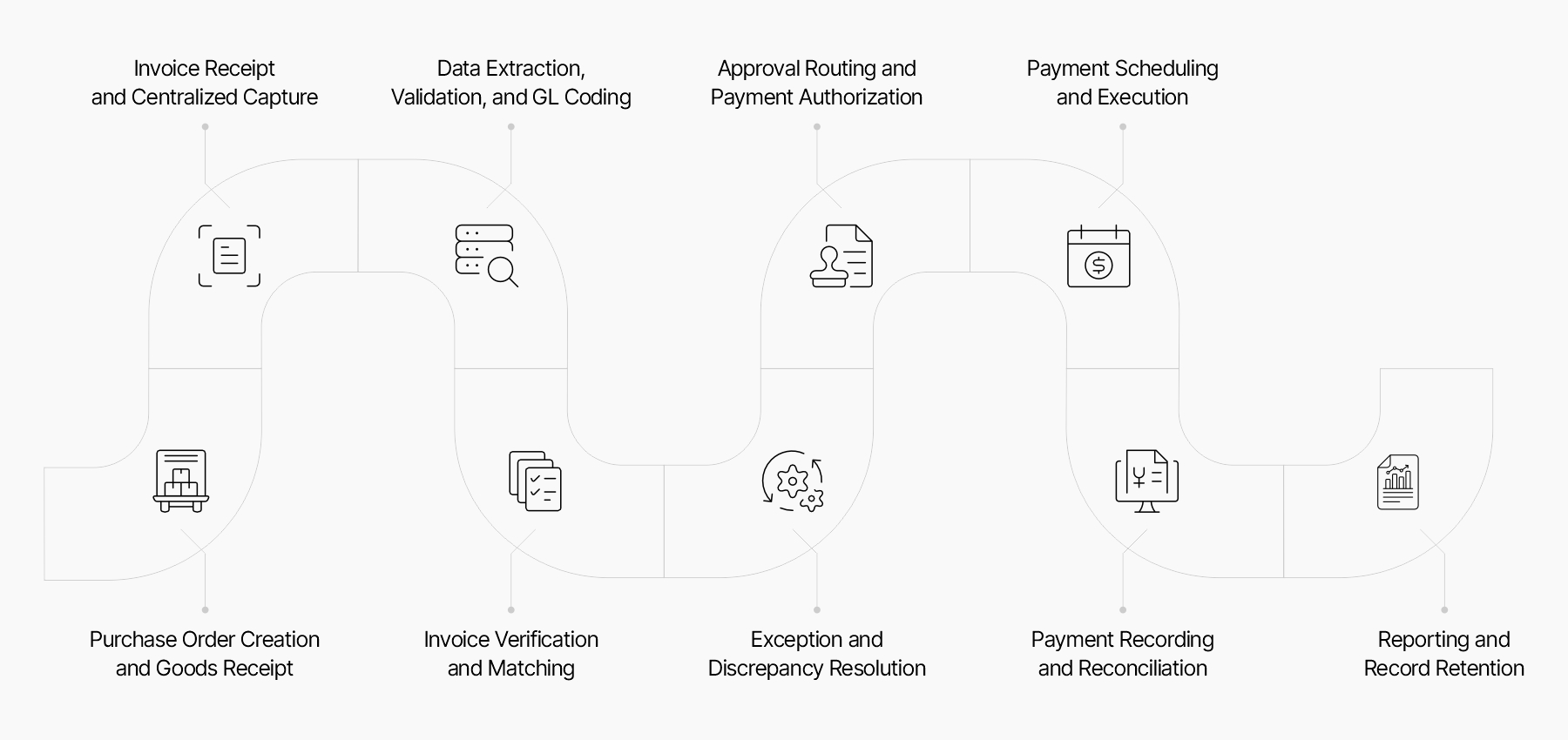
Step 1: Purchase Order Creation and Goods Receipt
The workflow begins before the invoice arrives. Procurement creates an approved purchase order that defines the commercial terms of the purchase.
After delivery, the receiving team records the quantity and condition of goods received. For services, the responsible department confirms that agreed work, hours, or milestones were completed.
Accurate PO and receipt records allow AP to verify invoices without repeatedly contacting employees for clarification.
Step 2: Invoice Receipt and Centralized Capture
Suppliers may submit invoices through email, supplier portals, electronic data interchange, scanned mail, shared drives, SFTP locations, or other channels.
A centralized intake process directs invoices into a controlled location. It reduces the risk of invoices remaining in personal inboxes, being processed twice, or reaching the wrong legal entity.
Each invoice should receive a unique system record and processing status. The system should also identify unreadable files, unsupported formats, missing pages, and suspected duplicates.
Step 3: Data Extraction, Validation, and GL Coding
Important invoice fields are captured and converted into structured accounting data. These fields commonly include supplier name, invoice number, dates, currency, PO number, tax, line items, payment terms, and total amount.
Validation checks may confirm:
- The supplier exists in the approved vendor master
- The invoice number has not already been recorded
- Totals and tax calculations are mathematically correct
- The currency matches the supplier or purchase order
- The invoice is addressed to the correct legal entity
- Required fields are present
- Payment details have not changed unexpectedly
The expense is then assigned to the appropriate general ledger account, cost center, department, project, location, or business unit.
PO-backed invoices may inherit coding from the purchase order, while non-PO invoices often require manual or rules-based coding.
Step 4: Invoice Verification and Matching
AP verifies the invoice against available purchasing and receiving records.
- A two-way match compares: Supplier invoice and Purchase order
- A three-way match compares: Supplier invoice, Purchase order and Goods receipt or service confirmation
The workflow may compare supplier identity, line descriptions, quantities, prices, tax amounts, freight, currency, payment terms, and invoice totals.
Organizations can apply tolerance rules for small differences. For example, a price difference below a defined percentage may pass automatically, while a larger difference is routed for investigation.
Step 5: Exception and Discrepancy Resolution
Invoices that fail validation or matching become exceptions. Common reasons include:
- Missing purchase order
- Invalid PO number
- Price variance
- Quantity variance
- Missing receipt
- Duplicate invoice number
- Tax discrepancy
- Incorrect legal entity
- Unrecognized supplier
- Changed bank details
- Contract limit exceeded
Each exception should be assigned to a named owner with a resolution deadline. The workflow should record the reason, supporting evidence, communication history, and final decision.
Invoices should not remain indefinitely in an undefined pending status. Escalation rules are needed when an exception is not resolved within the expected period.
Step 6: Approval Routing and Payment Authorization
After verification, the invoice enters the accounts payable approval workflow and is routed to the appropriate business and finance reviewers.
Approval rules may depend on:
- Invoice amount
- Cost center
- Legal entity
- Expense category
- Supplier
- Project
- Contract
- Exception status
- Risk classification
Low-value, fully matched invoices may require fewer approval steps. High-value, non-PO, unusual, or exception-heavy invoices may require review by department managers, procurement, finance, legal, compliance, or executive leadership.
A properly configured accounts payable approval workflow should also define:
- Primary and substitute approvers
- Sequential or parallel approval requirements
- Approval authority limits
- Escalation periods
- Rejection reasons
- Delegation rules
- Restrictions on self-approval
- Additional approval requirements for overrides
Payment authorization should remain separate from invoice approval. Approving the invoice confirms that the liability is legitimate. Authorizing payment confirms that the approved liability may be included in a payment run.
Step 7: Payment Scheduling and Execution
Approved invoices are scheduled according to due dates, payment terms, cash availability, supplier priority, discount opportunities, and payment policies.
Before execution, payment controls should verify:
- The invoice remains unpaid
- Required approvals are complete
- The supplier is not blocked
- Bank details are authorized
- The payment amount matches the approved amount
- The payment method is permitted
- The payment date complies with policy
- The payment batch does not contain suspicious duplicates
Treasury or another authorized function then releases the payment through ACH, wire transfer, check, card, or another approved method.
Step 8: Payment Recording and Reconciliation
After payment, the invoice is marked as paid and linked to the payment reference. The AP subledger is updated, and the accounting entry is posted to the general ledger.
Reconciliation confirms that:
- The correct supplier was paid
- The payment cleared the bank
- The invoice and payment amounts agree
- Discounts and deductions were recorded correctly
- Credit notes were applied
- No open liability remains incorrectly
- Bank and ledger balances agree
Uncleared, rejected, reversed, or returned payments must re-enter a controlled resolution workflow.
Step 9: Reporting and Record Retention
The final stage preserves transaction records and makes workflow information available for reporting.
Organizations should retain invoices, purchase orders, receipts, approvals, payment confirmations, exception records, tax evidence, and system logs according to legal and internal retention requirements.
AP reporting commonly covers:
- Open invoices
- Overdue liabilities
- Upcoming cash requirements
- Blocked invoices
- Approval delays
- Exception categories
- Supplier concentration
- Discount opportunities
- Payment accuracy
- Processing performance
Reports should support operational decisions as well as financial close, audit, compliance, and cash planning.
How Do Different Types of Invoice Workflows Operate?
Organizations rarely use one identical workflow for every invoice. The appropriate route depends on whether the invoice has a purchase order, relates to a recurring contract, or requires two-way or three-way matching.
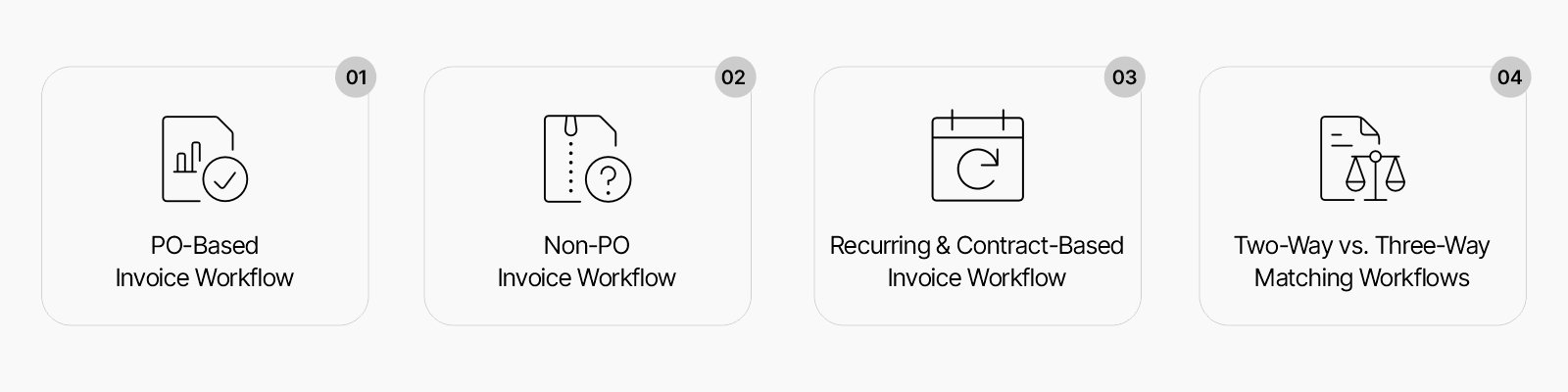
PO-Based Invoice Workflow
A PO-based invoice is matched with a previously approved purchase order and, where applicable, a receipt record.
The workflow generally follows this sequence:
- Capture invoice data
- Identify the purchase order
- Compare invoice and PO information
- Check receipt evidence
- Apply tolerance rules
- Route discrepancies for resolution
- Approve and schedule payment
Fully matched PO invoices may qualify for limited-touch or touchless processing because the spending decision was approved earlier in the purchasing cycle.
Non-PO Invoice Workflow
A non-PO invoice does not reference a valid purchase order. Common examples include legal fees, utilities, taxes, emergency purchases, subscriptions, rent, and certain professional services.
Because there is no purchase order to provide prior authorization, the workflow requires stronger coding and approval controls.
The reviewer may need to confirm:
- The expense is legitimate
- The supplier was authorized
- The service was received
- The price agrees with a contract or rate card
- The expense is coded correctly
- The approver has sufficient authority
- The purchase did not bypass procurement rules
Organizations should define which expense categories may be processed without a PO rather than treating every missing PO as an acceptable exception.
Recurring and Contract-Based Invoice Workflow
Recurring invoices arise from continuing agreements such as rent, software subscriptions, maintenance, telecommunications, insurance, and retained services.
These invoices may be validated against:
- Contract amount
- Billing frequency
- Service period
- Renewal date
- Usage threshold
- Escalation clause
- Approved rate
- Remaining contract value
The workflow should distinguish predictable recurring charges from unexpected changes. An invoice may pass automatically when it agrees with the contract but require review when the amount, frequency, bank details, or service scope changes.
Two-Way vs. Three-Way Matching Workflows
Two-way matching compares the invoice with the purchase order. It is appropriate when receipt confirmation is not required or when the purchase relates to certain services.
Three-way matching adds the goods receipt or service confirmation. It offers stronger evidence that the organization received what it was invoiced for.
| Matching element | Two-way matching | Three-way matching |
| Supplier invoice | Yes | Yes |
| Purchase order | Yes | Yes |
| Receipt confirmation | No | Yes |
| Suitable for physical goods | Limited | Yes |
| Control over undelivered items | Lower | Higher |
| Processing complexity | Lower | Higher |
Organizations may apply different matching methods based on purchase category, supplier risk, invoice value, and operational requirements.
Why Is an Efficient Accounts Payable Workflow Important?
An efficient accounts payable workflow improves payment accuracy, financial control, cash planning, supplier communication, and audit readiness.
Faster Invoice Processing
Centralized intake, clear ownership, standard validation, and defined approval routes reduce the time an invoice spends waiting for action.
Faster processing does not mean bypassing controls. It means removing unnecessary delays while preserving verification, approval, and payment authorization requirements.
Lower Processing Costs
Manual data entry, repeated follow-ups, paper handling, duplicate reviews, and unresolved exceptions increase the cost of processing each invoice.
A consistent AP workflow reduces repetitive activity and allows AP employees to focus on discrepancies, supplier issues, cash planning, and higher-risk transactions.
Fewer Errors and Duplicate Payments
Validation and duplicate checks reduce errors involving invoice numbers, amounts, supplier records, tax, coding, and payment status.
Controls can detect potential duplicates based on combinations of:
- Supplier
- Invoice number
- Invoice date
- Amount
- Purchase order
- Bank account
- Similar document images
Duplicate detection should occur when the invoice is received and again before payment release.
Better Cash Flow and Working Capital Control
AP workflow data shows which liabilities are approved, blocked, due, overdue, or scheduled for payment.
This information helps treasury and finance teams decide when to pay invoices, whether to use available discounts, and how much cash must be reserved for upcoming obligations.
Stronger Fraud Prevention and Internal Controls
AP workflows help prevent unauthorized or manipulated payments by requiring documented approval, supplier verification, bank detail controls, role-based access, and separation between invoice processing and payment release.
Higher-risk events may include:
- New supplier creation
- Bank account changes
- Urgent payment requests
- Split invoices below approval limits
- Repeated round-value invoices
- Unusual payment destinations
- Payments outside normal cycles
- Approver overrides
The workflow should route these events for additional verification rather than treating every invoice identically.
Improved Compliance and Financial Reporting
Documented workflows support tax compliance, accounting standards, audit requirements, retention policies, and internal financial controls.
Accurate invoice status also improves liability recognition, accrual calculations, expense reporting, and period-end close.
More Reliable Vendor Relationships
Suppliers expect accurate payments and clear information about invoice status. Missing invoices, unexplained deductions, repeated data requests, and late payments can weaken commercial relationships.
A controlled workflow enables AP teams to respond with specific information about receipt, approval, exceptions, payment dates, and remittance references.
Greater Scalability Across the Organization
As an organization grows, invoice volume may rise across entities, departments, currencies, and locations. Informal email approvals and spreadsheet trackers become difficult to manage at scale.
Standard rules and configurable workflow paths allow the organization to increase processing capacity without creating a separate operating method for every team.
Control Every AP Stage with Collatio AP Automation
Centralise invoice intake, matching, approvals, and exception handling. Maintain payment controls and complete audit trails across the AP workflow.
Book a free demoWhat Are the Common Accounts Payable Workflow Challenges?
AP workflow problems often arise at handoffs between systems, teams, and documents rather than within one isolated task.
Missing Invoices and Fragmented Intake Channels
Invoices may arrive through employee email accounts, branch offices, paper mail, supplier portals, and shared folders.
Fragmented intake makes it difficult to determine whether an invoice has been received, entered, approved, rejected, or paid. Centralized submission requirements and supplier instructions reduce this problem.
Manual Data Entry and Coding Errors
Employees may mistype invoice numbers, amounts, dates, tax values, cost centers, or GL codes. These errors can affect matching, payment accuracy, reporting, and reconciliation.
Standard coding rules, validation checks, supplier templates, and automated extraction can reduce manual input without removing human accountability.
Matching Exceptions and Unresolved Discrepancies
Price differences, missing receipts, partial deliveries, tax errors, and outdated purchase orders can prevent invoices from matching.
The main problem is often not the exception itself, but the absence of clear ownership. Exception categories should have assigned teams, target resolution times, and escalation paths.
Approval Bottlenecks and Unclear Ownership
Invoices may remain pending because the approver is unavailable, lacks sufficient information, or assumes another employee is responsible.
The accounts payable approval workflow should define primary approvers, substitutes, value thresholds, escalation periods, and actions for rejected invoices.
Duplicate, Unauthorized, or Incorrect Payments
Duplicate invoices may have different invoice formats, altered reference numbers, or separate submission routes. Unauthorized payments may result from supplier impersonation, compromised email accounts, false bank changes, or control overrides.
Payment validation must therefore examine invoice history, supplier status, approvals, bank information, and payment batch activity.
Limited Visibility Into Outstanding Payables
Spreadsheets and disconnected inboxes provide an incomplete view of liabilities. Finance teams may not know which invoices are awaiting approval, blocked by exceptions, or approaching their due dates.
A common status framework should show the exact stage and owner of every invoice.
Disconnected Documents and Systems
Invoices, purchase orders, contracts, receipts, supplier records, and payment information may be stored in separate applications.
Employees then spend time searching for evidence and manually transferring data between procurement, ERP, banking, and document systems. Integrated records reduce these handoff risks.
Managing Multiple Entities and Payment Methods
Multi-entity organizations must assign each invoice to the correct company, tax jurisdiction, currency, bank account, chart of accounts, and approval hierarchy.
The workflow should prevent one entity from paying another entity’s invoice without an approved intercompany process. It should also apply distinct controls to checks, ACH payments, international wires, cards, and local payment methods.
How Should AP Workflows Adapt to Invoice Risk?
Applying the same workflow to every invoice can create two problems. Low-risk invoices receive unnecessary review, while high-risk invoices may not receive enough scrutiny.
A risk-based accounts payable workflow adjusts validation, matching, approval, and payment controls according to the characteristics of the transaction.
Classify Invoices by Risk Level
Risk classifications may consider:
- Invoice value
- Supplier status
- Supplier country
- Payment destination
- Purchase category
- PO availability
- Contract coverage
- Bank detail changes
- Exception history
- Payment urgency
- User overrides
- Regulatory sensitivity
For example, a low-value invoice from an established supplier that fully matches an approved PO may follow a shorter route. A high-value non-PO invoice from a new supplier with recently changed bank details should receive additional verification.
Apply Controls Proportionately
A risk-based model may use:
- Standard approval for low-risk matched invoices
- Additional business approval for high-value expenditure
- Procurement review for non-PO purchases
- Tax review for complex jurisdictions
- Independent bank verification for supplier detail changes
- Treasury review for urgent or international payments
- Compliance review for restricted categories or countries
The workflow should document why additional controls were triggered and who resolved them.
Reassess Risk Throughout the Workflow
Risk can change after the invoice enters the system. A routine invoice may become higher risk if:
- The supplier requests a bank change
- An approver requests an unusual override
- The invoice is split into smaller amounts
- The payment date is moved forward
- Supporting documents are replaced
- The payment destination changes
- A duplicate pattern is detected
Continuous reassessment prevents an invoice from retaining a low-risk status after its characteristics materially change.
What Is Accounts Payable Workflow Automation?
Accounts payable workflow automation uses software, AI, and configurable business rules to capture invoice information, validate data, match supporting documents, route tasks, track approvals, schedule payments, and retain transaction records.
The purpose of automation is not to remove financial control or accounting judgment. It is to automate repetitive and rules-based activities while directing uncertain, incomplete, sensitive, or high-risk transactions to qualified employees.
Read: Accounts payable automation
A mature automated workflow can support:
- Centralized invoice intake
- Invoice and line-item data extraction
- Supplier and duplicate validation
- PO and receipt matching
- GL coding recommendations
- Exception classification
- Approval routing
- Payment validation
- Workflow tracking
- Audit trail creation
- Operational reporting
Manual vs. Automated Accounts Payable Workflows
The key difference between the manual and the automated workflows are:
| Workflow area | Manual workflow | Automated workflow |
| Invoice intake | Email, paper, and shared folders | Centralized digital capture |
| Data entry | Manually entered by employees | Extracted and validated automatically |
| Matching | Documents compared individually | Rules-based document matching |
| Approvals | Email requests and follow-ups | Configurable routing and escalation |
| Exception handling | Informal communication | Assigned queues and tracked resolution |
| Payment preparation | Spreadsheet-based payment lists | Validated payment proposals |
| Visibility | Periodic and fragmented | Real-time workflow status |
| Audit evidence | Collected manually | Preserved within transaction history |
The objective of accounts payable workflow automation is not to automate every decision. It is to reduce unnecessary manual touches while preserving human review for policy exceptions, unusual supplier activity, high-value invoices, and sensitive payments.
Automated Invoice Capture and Data Extraction
Accounts payable invoice workflow automation begins by collecting invoices from approved sources, such as supplier email addresses, portals, cloud storage, shared drives, SFTP locations, and electronic invoicing channels.
The system extracts relevant header and line-item fields, including:
- Supplier name
- Invoice number
- Invoice date
- Purchase order number
- Currency
- Tax amount
- Payment terms
- Line descriptions
- Quantities
- Unit prices
- Total payable amount
Extracted data can then be checked against supplier records, purchase orders, contracts, tax rules, and previous invoices. Low-confidence or conflicting values should be sent for human verification rather than being posted without review.
Effective accounts payable invoice workflow automation should process invoices at both the document and line-item level. Header-only extraction is insufficient when matching depends on individual quantities, prices, tax codes, or delivery records.
Rules-Based Invoice Matching
Matching rules compare invoices with POs, receipts, contracts, rate cards, or other supporting records.
Configurable tolerances can determine whether an invoice:
- Passes automatically
- Requires AP review
- Requires procurement review
- Requires receiving confirmation
- Must be rejected or returned to the supplier
Rules should be documented and periodically reviewed to prevent outdated tolerances from approving inappropriate variances.
Automated Exception Routing
Automation can categorize an exception and assign it to the team most capable of resolving it.
Examples include:
- Missing receipt routed to the receiving team
- Price variance routed to procurement
- Invalid cost center routed to the budget owner
- Tax discrepancy routed to tax or finance
- Supplier mismatch routed to vendor management
- Bank detail change routed to an independent verification team
Automated reminders and escalation rules prevent exceptions from remaining unattended.
Configurable Approvals and Escalations
Automation allows the accounts payable approval workflow to route invoices according to transaction value, department, legal entity, expense type, supplier, location, and risk level.
A controlled approval configuration should include:
- Authority limits
- Sequential and parallel approvals
- Substitute approvers
- Escalation deadlines
- Rejection reasons
- Temporary delegation periods
- Prohibition of self-approval
- Additional review for exceptions
- Higher approval thresholds for unusual payments
Approval rules should not remain static. They must be updated when reporting structures, employee responsibilities, budgets, legal entities, or risk policies change.
All configuration changes should require authorization and be recorded in the system audit history.
Automated Payment Validation and Scheduling
Approved invoices can be grouped into payment proposals based on due date, entity, currency, payment method, bank account, and supplier terms.
Before payment, the system can repeat checks for:
- Duplicate invoices
- Blocked suppliers
- Missing approvals
- Changed bank details
- Unsupported payment methods
- Unusual payment values
- Repeated urgent payment requests
- Invalid bank accounts
Final payment release should remain restricted to authorized employees.
Real-Time Workflow Tracking and Reporting
Workflow tracking shows where each invoice is located, how long it has remained there, who owns the next action, and what issue is preventing completion.
Dashboards can report:
- Invoices received
- Invoices awaiting validation
- Matching failures
- Pending approvals
- Overdue approvals
- Blocked payments
- Upcoming due dates
- Payment status
- Exception trends
This information allows managers to address recurring causes rather than repeatedly resolving individual symptoms.
Human Review in an Automated AP Workflow
Human review remains an important part of accounts payable workflow automation, particularly when the system encounters uncertainty, policy exceptions, high-risk transactions, unusual supplier behavior, or incomplete supporting evidence.
Reviewers should receive:
- The original invoice
- Extracted invoice data
- Supporting purchase documents
- Failed validation checks
- Matching discrepancies
- Confidence indicators
- Previous supplier activity
- Approval history
- Payment risk signals
Human actions should also be recorded, including the decision made, reason for the decision, evidence reviewed, data changed, override applied, approval authority, and date of action.
How to Automate Accounts Payable Workflow With AI
Businesses evaluating how to automate accounts payable workflow with AI should begin by separating repetitive processing tasks from activities that require accounting judgment, policy interpretation, or risk review.
AI can support several stages of the workflow:
- Classifying incoming invoice documents
- Extracting header and line-item information
- Identifying the correct supplier and legal entity
- Recommending GL accounts and cost centers
- Matching invoices with purchase orders and receipts
- Detecting duplicate or unusually similar invoices
- Categorizing exceptions
- Prioritizing high-risk transactions
- Identifying abnormal payment patterns
- Predicting which approvals may become overdue
A practical implementation sequence is:
- Centralize invoice intake.
- Standardize invoice and supplier data.
- Define matching and validation rules.
- Establish approval and escalation requirements.
- Train AI models on representative documents.
- Set confidence thresholds for automatic processing.
- Route uncertain results for human review.
- Measure extraction, matching, exception, and approval performance.
- Refine rules based on processing outcomes.
AI should not automatically approve every invoice. High-value payments, supplier bank changes, policy overrides, unusual payment destinations, and unresolved matching discrepancies should remain subject to independent review.
The most effective approach to automating accounts payable workflow with AI combines machine-based document interpretation with deterministic controls, approval authority, human review, and complete audit evidence.
How Can Businesses Improve the Accounts Payable Workflow?
Improving the accounts payable workflow requires more than replacing paper invoices with digital files. Organizations must address intake controls, document quality, ownership, approval design, exception handling, system connections, and payment security.
The improvement process should begin by documenting the current workflow and identifying where invoices are delayed, duplicated, manually re-entered, or processed without sufficient evidence.
Map the Current Workflow and Identify Broken Handoffs
Document how the AP workflow actually operates, including informal steps that may not appear in official policies.
The assessment should identify:
- Invoice intake channels
- Manual data entry points
- Matching stages
- Approval levels
- Exception owners
- Duplicate checks
- Payment controls
- System transfers
- Reconciliation steps
- Rework loops
- Unrecorded decisions
Particular attention should be given to handoffs between AP, procurement, receiving, budget owners, treasury, and finance. These transition points are frequent sources of delay and unclear responsibility.
Centralize Invoice Intake and Vendor Communication
Create approved invoice submission channels and provide suppliers with clear instructions.
Centralization should include:
- A defined invoice address or portal
- Legal entity requirements
- Required PO references
- File format rules
- Contact details for queries
- Duplicate submission guidance
- Status communication procedures
Supplier inquiries should be recorded against the invoice rather than managed only through individual email accounts.
Establish a PO-First Policy Where Appropriate
A PO-first policy requires a purchase order before the supplier delivers goods or performs services, except for defined categories.
The policy should specify:
- Which purchases require a PO
- Which categories are exempt
- Who may authorize emergency purchases
- How retrospective POs are handled
- What happens when suppliers omit the PO number
- Whether non-compliant invoices are returned or escalated
A PO-first policy works only when the purchasing process is practical enough for employees to follow.
Define Approval Thresholds and Responsibilities
Create an accounts payable approval workflow based on transaction value, department, entity, category, and risk.
The approval matrix should answer:
- Who owns the budget?
- Who confirms receipt?
- Who approves the accounting treatment?
- Who approves policy exceptions?
- Who authorizes payment?
- Who acts when the primary approver is unavailable?
Approval authority should be reviewed when employees change roles or leave the organization.
Standardize Exception Resolution Procedures
Create named categories for common exceptions and define the correct response for each one.
Every category should have:
- Responsible owner
- Required supporting evidence
- Target resolution time
- Escalation path
- Permitted override
- Approval requirement
- Supplier communication rule
- Closure reason
Standardization makes exception reporting more useful and helps management identify upstream process failures.
Connect AP With Procurement and Payment Systems
AP should be able to access purchase orders, receipt records, contracts, supplier information, accounting data, and payment status without relying on repeated manual transfers.
System connections should preserve:
- Common identifiers
- Data validation
- Approval status
- Posting status
- Payment references
- Error messages
- Change history
Failed system transfers should be visible and assigned for resolution.
Strengthen Segregation of Duties
No employee should control all stages of supplier creation, invoice approval, payment preparation, and payment release.
Key separations may include:
- Supplier creation separate from invoice processing
- Invoice approval separate from payment release
- Bank detail changes separate from bank verification
- Payment preparation separate from final authorization
- Reconciliation separate from transaction creation
- Access administration separate from operational processing
Smaller organizations may use compensating controls, such as management review, transaction reports, or independent bank reconciliation, when full separation is not practical.
Review Workflow Performance Regularly
The accounts payable workflow process should be reviewed by invoice type, supplier, legal entity, department, exception category, approval stage, and payment method.
Management should investigate recurring patterns such as:
- Repeated approval delays in one department
- Suppliers regularly submitting incomplete invoices
- High non-PO spending in specific categories
- Missing receipt confirmations
- Low first-pass match rates
- Frequent urgent payment requests
- Excessive manual overrides
- Repeated supplier bank changes
The purpose of workflow measurement is to identify operating causes and control weaknesses, not simply to report average processing times.
Which Accounts Payable Workflow KPIs Should You Track?
Accounts payable workflow KPIs should measure speed, cost, accuracy, automation, control effectiveness, and payment performance. Metrics should be segmented wherever possible. A single overall average may hide meaningful differences between PO invoices, non-PO invoices, recurring invoices, exception invoices, legal entities, or departments.
- Invoice Processing Cycle Time
Invoice processing cycle time measures the period from invoice receipt to approval, posting, or payment. Organizations should define the endpoint clearly. Mixing approval time and payment time can produce misleading comparisons because an approved invoice may be intentionally held until its due date.
According to Ardent Partners’ 2025 AP benchmarks, best-in-class AP teams process invoices in 3.1 days, compared with 17.4 days for other organizations, showing how structured workflows and automation can significantly reduce invoice cycle time.
- Cost per Invoice
Cost per invoice estimates the total expense of processing an invoice, including labor, systems, document handling, exception resolution, management oversight, and payment administration. It should be analyzed separately for PO invoices, non-PO invoices, matched invoices, and exception invoices because their processing requirements differ significantly.
- First-Pass Match Rate
First-pass match rate measures the percentage of invoices that agree with supporting documents without manual correction or exception resolution. A low first-pass match rate may indicate poor purchase order quality, missing receipts, supplier billing problems, inappropriate tolerances, inaccurate extraction, or gaps in contract data.
- Invoice Exception Rate
The invoice exception rate measures the proportion of invoices that fail validation, matching, coding, or policy checks. Exception categories should be tracked individually so AP teams can identify the most frequent causes and correct recurring workflow problems.
- Approval Turnaround Time
Approval turnaround time measures how long invoices remain with business approvers. Results should be segmented by approver, department, invoice value, and workflow type. This helps distinguish isolated approval delays from structural bottlenecks.
- Touchless Processing Rate
The touchless processing rate measures the percentage of invoices completed without manual intervention. A touchless invoice may be captured, validated, matched, approved under predefined rules, posted, and scheduled for payment automatically. Organizations should avoid increasing this metric by weakening controls or excluding difficult invoices from measurement.
- On-Time Payment Rate
The on-time payment rate measures the percentage of invoices paid according to agreed supplier terms. Late payments may result from intake delays, unresolved exceptions, slow approvals, cash constraints, or payment failures. This metric should therefore be connected to workflow-stage data.
- Early-Payment Discount Capture Rate
This metric measures the proportion of available early-payment discounts that the organization successfully uses. A missed discount may indicate slow processing, poor cash visibility, unclear discount terms, or delayed approval.
- Duplicate Payment Rate
The duplicate payment rate measures confirmed duplicate payments as a proportion of total invoices or payment value. Potential duplicates caught before payment should be tracked separately from duplicates recovered after payment because the control outcomes are different.
How Do You Choose the Right AP Workflow System?
The right AP workflow system should support the organization’s accounts payable workflow process, invoice types, control model, ERP environment, entity structure, payment operations, and reporting requirements.
The evaluation should consider whether the platform can support both standard processing and higher-risk exceptions without forcing finance teams to manage important controls outside the system.
Workflow Flexibility and Rule Configuration
The platform should support different routes based on:
- Transaction amount
- Department
- Legal entity
- Supplier
- Currency
- Expense category
- PO status
- Exception type
- Payment method
- Risk level
Finance administrators should be able to configure the accounts payable approval workflow without requiring extensive development for every policy change.
Invoice Capture and Matching Capabilities
Evaluate whether the system supports accounts payable invoice workflow automation across the invoice formats and intake channels used by the organization.
The platform should be able to:
- Receive invoices from approved channels
- Process relevant file formats
- Extract header and line-item data
- Validate required fields
- Detect duplicate invoices
- Match invoices with POs and receipts
- Support configurable tolerances
- Process credit notes
- Handle partial invoices
- Process multi-page documents
- Separate files containing multiple invoices
Exception Management Features
The system should categorize exceptions, assign owners, preserve communication, track resolution time, and escalate overdue tasks. Users should be able to understand why an invoice failed without interpreting technical error codes.
ERP and Payment System Compatibility
Confirm how the system exchanges supplier, PO, receipt, accounting, tax, invoice, and payment data with existing applications.
The evaluation should cover:
- Integration method
- Transfer frequency
- Error handling
- Duplicate prevention
- Field mapping
- Posting confirmation
- Security
- Monitoring
- Upgrade responsibility
Multi-Entity and Multi-Currency Support
Organizations operating across entities should verify support for:
- Entity-specific approval rules
- Separate charts of accounts
- Local tax requirements
- Multiple currencies
- Exchange rate handling
- Entity-specific bank accounts
- Intercompany transactions
- Regional payment methods
- Consolidated reporting
Security and Access Controls
Security and access control should follow job responsibilities and be reviewed periodically.
Required security features may include:
- Role-based access
- Single sign-on
- Multi-factor authentication
- Encryption
- User activity logs
- Approval history
- Access reviews
- Data retention controls
- Restricted payment permissions
- Controlled configuration changes
Reporting and Analytics
The system should report both transaction status and workflow performance. Users should be able to analyze invoices by supplier, entity, approver, status, exception type, due date, payment method, currency, and processing time.
Reports should also allow finance teams to trace summary figures back to individual invoices and supporting records.
Supplier Collaboration Features
Supplier-facing capabilities may include invoice submission, status tracking, document correction, query management, and remittance access.
These features can reduce repetitive inquiries, but suppliers should not be able to alter approved invoice data or payment details without controlled verification.
Implementation Support
Implementation should cover both technical configuration and operational workflow design. An accounts payable workflow automation project should not be considered complete when the software becomes available. It is complete when the workflow, controls, users, integrations, exception procedures, and reporting operate reliably in production.
Important activities include:
- Mapping the existing AP workflow
- Designing the future-state workflow
- Configuring matching rules
- Building approval routes
- Connecting ERP and payment systems
- Migrating supplier and accounting data
- Testing invoice scenarios
- Configuring access rights
- Training users
- Onboarding suppliers
- Establishing support procedures
Total Cost of Ownership
Total cost of ownership includes more than subscription or license fees.
The assessment should consider:
- Implementation
- Integration
- Configuration
- Data migration
- Training
- Internal support
- System administration
- Upgrade work
- Transaction charges
- Storage
- Supplier onboarding
- Custom reporting
- Payment fees
Cost should be evaluated against processing capacity, control improvement, reduced rework, error prevention, and employee time released for higher-value finance activities.
Final Thoughts on Building a More Controlled AP Workflow
A well-designed accounts payable workflow connects purchasing evidence, invoice information, approvals, payment controls, accounting records, and audit documentation within one traceable sequence.
Accounts payable workflow automation can support document capture, invoice matching, approval routing, exception handling, payment validation, and reporting. However, automation must be supported by reliable source data, documented policies, responsible users, access controls, and periodic performance reviews.
Collatio AP Automation by Scry AI helps finance teams manage accounts payable invoice workflow automation, configurable approvals, document matching, exception resolution, payment validation, audit trails, and workflow reporting within a connected AP environment.
Book a demo with Scry AI to see how Collatio AP Automation can support a faster, more traceable, and better-controlled accounts payable workflow process.