Accounts Reconciliation
 Financial Spreading
 Digital Archive
 SchematicIQ
 Loan Ops
 Docutwin
 Contract intelligence
 KYC/KYB
 Form Processing
 Investment Statements
 Enterprise Knowledge
Agent
Enterprise Knowledge
Agent Realtime Intelligence
 Customer Support 360
 Analytica
 CreditIQ
 City Intelligence
 Smart Utilities
 Connected Worker & Assets
 Drone Based Infra Monitoring
 SceneTrack







Key Takeaways
- Vendor data requires consistent governance and ownership.
- Centralized records improve accuracy across business systems.
- Verification reduces fraud and payment errors.
- Standard formats prevent duplicates and data conflicts.
- Role-based approvals protect sensitive vendor changes.
- Automation improves validation, monitoring, and synchronization.
- Regular cleansing keeps vendor records current.
- Clear metrics measure data quality and control performance.
- Collatio validates vendor information across AP documents.
Inaccurate vendor records can affect multiple finance and procurement processes. Incorrect banking information may result in fraudulent or misdirected payments, duplicate supplier profiles can compromise spend analysis, and outdated tax documents may increase compliance risk. As the vendor base expands, managing this information through spreadsheets and disconnected systems becomes increasingly difficult.
Vendor master data management provides a structured framework for collecting, verifying, storing, updating, and sharing vendor information. It enables procurement, accounts payable, finance, compliance, and audit teams to access consistent and verified records. This guide examines the vendor data lifecycle, its business value, common management challenges, recommended practices, automation opportunities, and performance metrics.
What Is Vendor Master Data Management?
Vendor master data management is the process of creating, governing, maintaining, and deactivating vendor records across their lifecycle. It defines how vendor information is collected, verified, approved, stored, updated, and shared with ERP, procurement, accounts payable, and payment systems.
Some organizations refer to this discipline as master vendor data management. Regardless of the terminology, its purpose is to maintain accurate and authorized vendor records across every system that depends on them.
Vendor Master Data vs. Supplier Master Data
Vendor master data and supplier master data are often used interchangeably. However, some organizations distinguish between them based on the scope and nature of the business relationship.
| Comparison Area | Vendor Master Data | Supplier Master Data |
| Relationship scope | Supports vendor relationships through individual or recurring transactions involvement | Supports broader, long-term supplier relationships |
| Primary purpose | Facilitates purchasing, invoicing, accounting, and payments | Supports sourcing, contracting, performance management, and supply continuity |
| Common information | Business details, tax information, banking data, payment terms, and contact details | Vendor information plus sourcing categories, performance scores, capacity, and supply chain risk |
| Contract coverage | May contain basic contract references and transaction terms | Often includes detailed obligations, renewal terms, service levels, and compliance requirements |
| Primary users | Accounts payable, finance, and operational teams | Procurement, supply chain, risk, and supplier management teams |
Core Components of a Vendor Master Record
A vendor master record is the approved profile used to identify, transact with, and monitor a vendor. A complete record generally contains:
- Legal and trading names
- Vendor identification number
- Registered and operating addresses
- Contact information
- Tax identification and classification
- Banking and payment instructions
- Currency and payment terms
- Procurement category and business unit
- Contract references
- Compliance documents
- Risk classification
- Approval and change history
- Record status and effective dates
Each field should have an assigned owner, validation rule, permitted format, and source of verification.
Business, Tax, Banking, Contract, and Compliance Information
Vendor data supports several business processes, so the record must contain more than basic contact information.
- Business information: Legal name, registration number, ownership structure, business address, and authorized representatives.
- Tax information: Tax identification numbers, withholding classifications, exemption certificates, and jurisdiction-specific forms.
- Banking information: Account holder name, bank name, account number, routing code, SWIFT or IBAN details, and supported payment method.
- Contract information: Contract number, effective dates, pricing terms, service-level commitments, renewal conditions, and termination provisions.
- Compliance information: Sanctions screening results, insurance certificates, licenses, beneficial ownership details, and risk assessments.
Sensitive fields should be encrypted, access-controlled, and subject to additional verification before creation or modification.
Why Is Vendor Master Data Management Important, and What Are Its Benefits?
Vendor master data management is important because vendor records influence purchasing, invoicing, payments, tax reporting, compliance, and financial analysis. Poor data quality can create errors at every stage of the procure-to-pay process.
A governed vendor database helps businesses prevent unauthorized changes, reduce operational delays, and produce more reliable financial information.
Centralized and Consistent Vendor Records
A centralized vendor record gives departments an approved source for supplier information. Procurement, accounts payable, finance, and compliance teams can work from consistent names, addresses, tax details, and payment instructions.
Centralization does not always require every application to use the same database. It requires a designated system of record and controlled synchronization rules for connected systems.
Improved Vendor Data Accuracy
Validation standards reduce incomplete, outdated, or incorrectly formatted information. Required fields, reference checks, format controls, and approval workflows prevent low-quality data from entering operational systems.
Accurate vendor information also improves accounts payable reconciliation by helping teams match invoices, vendor statements, credit memos, payments, and ledger entries without inconsistencies in identity, tax, or banking.
The financial consequences of inaccurate data can be substantial. A 2025 IBM Institute for Business Value report found that more than one-quarter of organizations estimate losing over $5 million annually due to poor data quality, underscoring the need for accurate, verified, and consistently maintained vendor records.
Reduced Fraud and Payment Risk
Vendor master data is a frequent target for business email compromise, false supplier creation, and unauthorized bank account changes. Controlled onboarding and change management make these activities more difficult.
Payment fraud remains a significant concern for finance teams. The 2026 AFP Payments Fraud and Control Survey found that 76% of organizations experienced attempted or actual payment fraud in 2025, highlighting the importance of vendor identity verification, controlled bank-detail changes, and segregation of duties.
Risk controls can include:
- Independent vendor verification
- Bank account ownership checks
- Dual approval for sensitive changes
- Segregation of duties
- Duplicate account detection
- Confirmation through previously verified contact details
- Alerts for unusual changes or payment behavior
These controls create a documented chain between the requested change, supporting evidence, approver, and effective date.
Faster Vendor Onboarding and Invoice Processing
Standard forms and validation rules reduce the repeated requests that delay vendor onboarding. Once verified data is distributed to procurement, ERP, and accounts payable systems, the vendor can become transaction-ready sooner.
Accurate master data also allows invoices to match more reliably against purchase orders, receipts, contracts, and payment terms. This reduces manual exception handling and approval delays.
Better Compliance and Audit Readiness
Vendor records may contain evidence required for tax reporting, sanctions compliance, anti-bribery controls, internal policies, and industry regulations. Maintaining this information within a governed process makes documentation easier to retrieve and review.
Approval history, field-level changes, screening results, and archived documents allow auditors to determine who acted, why it occurred, and what information was used.
Greater Spend Visibility and Reporting Accuracy
Duplicate and inconsistent vendor records fragment spending across different names, locations, and identifiers. As a result, the same vendor may appear as several unrelated suppliers in financial reports.
Consolidated records help organizations:
- Calculate total spending by vendor or vendor group
- Identify purchasing outside negotiated contracts
- Measure category-level expenditure
- Track payment concentration
- Assess supplier dependency
- Improve cash flow and procurement forecasts
A parent-child hierarchy can also connect subsidiaries, regional entities, and trading names to a common vendor group.
Improved Supplier Relationships and Procurement Decisions
Reliable vendor information reduces onboarding delays, payment disputes, and repeated document requests. Suppliers receive clearer requirements and more predictable processing.
Procurement teams can also combine vendor records with contract, performance, risk, and spending data. This supports better sourcing decisions, contract negotiations, supplier segmentation, and continuity planning.
How Does Vendor Master Data Management Work, and What Challenges Affect It?
Vendor master data management follows a controlled lifecycle that includes data collection, validation, approval, record creation, system distribution, maintenance, and deactivation. Challenges arise when these activities depend on disconnected systems, manual entry, or unclear ownership.
Vendor Data Collection
Vendor information is collected through onboarding forms, supplier portals, procurement systems, tax documents, contracts, banking records, and compliance certificates. Structured digital forms help businesses collect information in standardized fields and use documents as supporting evidence.
Practical example: A new logistics provider submits its legal name, tax number, bank details, insurance certificate, and payment terms through a supplier portal. The system prevents submission until every mandatory field and document is provided.
Data Validation and Approval
Submitted information is checked for accuracy, completeness, duplication, and compliance. Validation may include business registration checks, tax number verification, bank account confirmation, sanctions screening, and document expiry reviews.
Approval requirements should correspond to vendor risk, transaction value, geography, and access to sensitive information.
Practical example: A local office supplies vendor may require approval from procurement and accounts payable. An international technology vendor with access to customer data may also require information security, legal, compliance, and finance approval.
Record Creation and System Distribution
Once approved, the vendor receives a unique identifier. Authorized information is then distributed to ERP, procurement, accounts payable, and payment systems.
Data ownership rules specify which system controls each field and whether updates occur immediately or at scheduled intervals.
Practical example: After a vendor is approved, the system creates vendor ID V-10458. Its tax and payment details are sent to the ERP, while contract and performance information is sent to the procurement system. Only the approved source system can modify the banking fields.
Ongoing Maintenance and Vendor Deactivation
Vendor records must be updated when addresses, ownership details, tax classifications, contracts, payment terms, or bank accounts change. Documents with expiry dates should be monitored and renewed before they become invalid.
When the business relationship ends, the vendor should be deactivated rather than deleted so historical records remain available.
Practical example: A vendor’s insurance certificate is due to expire in 30 days. The system sends a renewal request and restricts new purchase orders if the updated certificate is not received. When the contract ends, the vendor is marked inactive while previous invoices and payments remain accessible.
Duplicate and Outdated Vendor Records
Duplicate records are often created when employees fail to check existing names, tax numbers, addresses, or bank accounts. Minor naming differences may cause the same company to appear as multiple vendors.
Outdated information can lead to returned payments, incorrect tax treatment, and communication failures.
Practical example: “ABC Technology Limited” and “ABC Technologies Ltd.” are entered as separate vendors. A duplicate check identifies that both records share the same tax number and bank account, preventing spend and payment history from being divided between two profiles.
Fragmented Data Across Business Systems
ERP, procurement, contract, accounts payable, and supplier portal systems may contain different versions of the same vendor record. Without synchronization and ownership rules, a valid update in one system may not reach the others.
Practical example: A supplier updates its address through the procurement portal, but the change is not transferred to the ERP. As a result, purchase orders use the new address while tax documents and payment records continue to use the previous one.
Inconsistent Data Formats
Variations in legal names, abbreviations, addresses, tax numbers, bank codes, and date formats reduce matching accuracy. They can also interfere with vendor consolidation and financial reporting.
Data standards should accommodate country-specific requirements while maintaining consistent enterprise rules.
Practical example: One system records a vendor as “Global Services Pvt. Ltd.” while another uses “Global Services Private Limited.” Standardization rules normalize the legal suffix and confirm the tax identifier before the records are compared or consolidated.
Weak Access and Approval Controls
Excessive access may allow one employee to create a vendor, modify banking information, approve invoices, and release payments. This lack of separation increases the possibility of unauthorized activity and processing errors.
Sensitive actions should require separate request, verification, approval, and payment roles.
Practical example: An accounts payable employee receives an email requesting a bank account change. The employee can submit the request but cannot approve it. A separate authorized reviewer confirms the change using the vendor’s previously verified contact information before the new account becomes active.
Manual Data Entry and Maintenance
Manual entry increases the likelihood of typographical errors, missing information, and processing delays, especially when vendor data must be copied into several systems.
It may also separate a change from its supporting documents, verification results, and approval history.
Practical example: An employee manually enters a supplier’s account number into the ERP and reverses two digits, causing the payment to fail. With automated data capture and validation, the account number can be extracted from the submitted document, compared with the onboarding form, and routed for review if the values differ.
Strengthen Vendor Data Controls with Collatio's Accounts Payable Automation
Validate supplier information against invoices, purchase orders, contracts, and payment records to identify duplicates, inconsistencies, and unauthorized changes.
Book a free demoWhat Are the Best Practices for Vendor Master Data Management?
Vendor master data management best practices combine data governance, verification, access control, lifecycle monitoring, and system integration. The goal is to prevent poor-quality data from entering the vendor master while identifying changes that require review.
Establish Clear Data Ownership and Governance
Assign responsibility for every stage of the vendor lifecycle. The governance model should identify who can request, validate, approve, create, update, review, and deactivate vendor records.
A cross-functional governance group can define data policies, resolve ownership conflicts, approve standards, and review performance metrics.
Maintain a Centralized Vendor Data Repository
Designate an authoritative source for approved vendor data. Other applications should receive information through controlled integrations rather than maintaining independent records without synchronization.
The repository should preserve vendor hierarchies, documents, verification evidence, approval history, record status, and effective dates.
Standardize Vendor Data Fields and Formats
Create a data dictionary that defines each field, permitted values, naming conventions, validation requirements, and ownership. Standardization should cover addresses, legal names, bank codes, tax identifiers, payment terms, and vendor categories.
Use dropdown lists, controlled reference tables, and format checks wherever practical. Free-text entry should be limited to fields that genuinely require it.
Verify Business, Tax, and Banking Details
Validate submitted information against authoritative sources before activating the vendor. The depth of verification should correspond to payment value, location, service category, and risk classification.
Banking information should be confirmed independently, particularly when a vendor requests a change shortly before a scheduled payment.
Control Changes to Sensitive Vendor Information
Bank accounts, payment methods, tax identifiers, ownership details, and legal names should be classified as sensitive fields. Changes should trigger additional validation and approval.
Controls should include:
- Authentication of the requester
- Comparison with the existing record
- Independent verification through an established contact
- Dual approval
- Temporary payment holds when risk indicators appear
- Notifications to relevant stakeholders
- Complete before-and-after field history
Apply Role-Based Access and Segregation of Duties
Users should receive the minimum permissions required for their responsibilities. The same person should not control vendor creation, invoice approval, and payment release.
Access reviews should also identify dormant accounts, conflicting roles, emergency permissions, and users who changed departments.
Conduct Compliance and Sanctions Screening
Screen vendors against applicable sanctions, politically exposed persons, adverse media, tax, and regulatory databases. Screening should occur during onboarding and periodically throughout the relationship.
Continuous screening may be appropriate for high-risk vendors because regulatory status and ownership information can change after onboarding.
Cleanse and Update Vendor Records Regularly
Data cleansing should correct incomplete fields, inconsistent formats, invalid addresses, expired documents, and conflicting values. Review frequency should be based on vendor risk and transaction activity.
Event-driven reviews can complement scheduled cleansing. A returned payment, ownership change, unusual invoice pattern, or repeated mismatch may indicate that the record needs immediate attention.
Deactivate Duplicate, Dormant, and High-Risk Vendors
Define inactivity periods for identifying dormant vendors. Before deactivation, verify that there are no open purchase orders, invoices, payments, disputes, or contractual obligations.
Duplicate records should be merged or blocked according to documented rules. Historical transactions must remain traceable to the surviving record.
Maintain Complete Approval and Audit Trails
Record every request, validation, approval, rejection, modification, and status change. Audit trails should capture the user, timestamp, previous value, new value, supporting evidence, and reason for the action.
Effective-dated records are particularly useful because they show which information was valid when a transaction occurred, even if the vendor profile changed later.
How Can Automation and System Integration Improve Vendor Master Data Management?
Automation and system integration create a controlled flow of vendor information across procurement, ERP, accounts payable, and payment systems. For data integration, they validate data at the point of entry, synchronize approved updates, flag anomalies, and preserve change histories, allowing teams to concentrate on high-risk vendors and exceptions that require investigation.
Automated Data Capture and Validation
Intelligent document processing can extract business names, tax numbers, addresses, bank details, and contract dates from onboarding documents. Extracted information can be compared with submitted form data before record creation.
Validation rules can flag missing fields, invalid formats, expired documents, and inconsistencies for review.
Duplicate Vendor and Anomaly Detection
Matching algorithms can compare legal names, aliases, addresses, tax identifiers, email domains, and bank accounts. Fuzzy matching helps detect duplicates that exact matching would miss.
Anomaly detection can identify unusual conditions, such as multiple unrelated vendors using the same bank account or a bank change submitted immediately before a large payment.
Continuous Data Quality Monitoring
Automated monitoring can score records based on completeness, validity, consistency, uniqueness, and timeliness. Dashboards can then show declining data quality before it affects payments or reporting.
Monitoring should focus on field-level issues and their downstream impact rather than relying on a single overall score.
Vendor Identity and Bank Account Verification
Connections to business registries, tax databases, and bank verification services can confirm vendor identity and account ownership. Verification responses should be stored with the vendor record as dated evidence.
Failed or inconclusive checks should route the record to manual review rather than allowing automatic activation.
Integration with ERP and Accounts Payable Systems
ERP and accounts payable integration ensures that approved vendor details are available for invoice matching, posting, payment scheduling, and reconciliation.
The integration should define field ownership, error handling, retry rules, update frequency, and reconciliation procedures between source and destination systems.
Integration with Procurement and Supplier Portals
Supplier portals allow vendors to submit and update information through structured workflows. Procurement integration connects vendor records with sourcing events, contracts, purchase orders, performance evaluations, and risk assessments.
Vendor-submitted changes should remain pending until internal verification and approval are completed.
Real-Time Data Synchronization Across Systems
Real-time synchronization reduces the interval during which systems contain conflicting information. This is particularly important for payment holds, vendor deactivation, compliance status, and approved banking changes.
Organizations should also reconcile synchronized records periodically. Integration can move inaccurate data quickly, so validation must occur before distribution.
Yes. Presenting this section as sequential steps will make the implementation process clearer while retaining the measurement framework.
How Should Businesses Implement and Measure Vendor Master Data Management?
Businesses should implement vendor master data management through a phased process that combines data governance, record cleansing, system integration, access controls, and performance measurement. The following steps provide a structured approach.
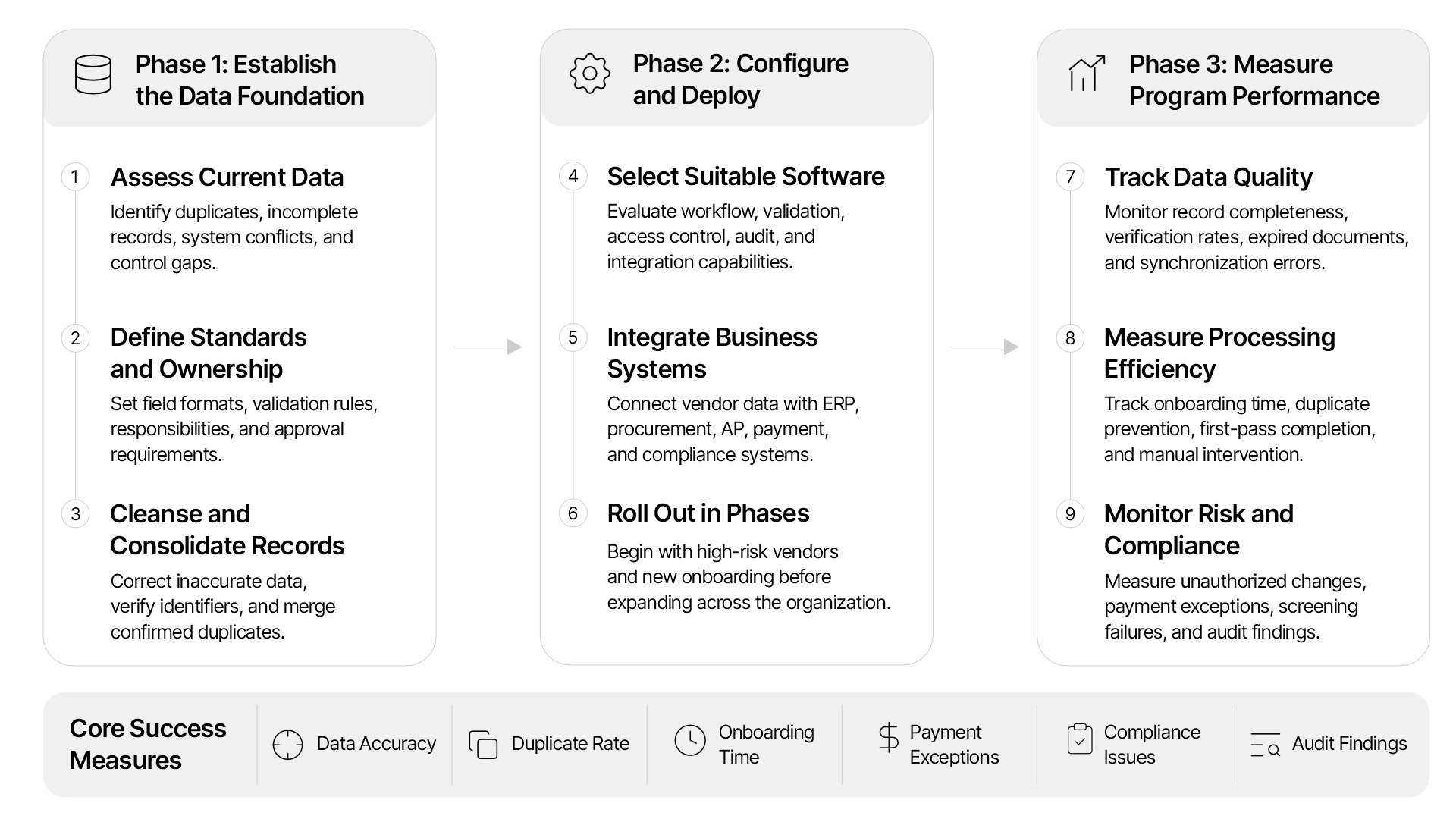
Step 1: Assess Existing Vendor Data and Processes
Identify every system, spreadsheet, portal, and department that creates or maintains vendor information. Document how records are collected, validated, approved, updated, and transferred between systems.
The assessment should identify:
- Duplicate and inactive vendors
- Missing or incomplete fields
- Conflicting values across systems
- Unverified banking and tax information
- Sensitive data stored outside approved applications
- Gaps in access and approval controls
Step 2: Define Data Standards and Responsibilities
Create standardized field definitions, formats, validation rules, vendor classifications, ownership roles, and approval requirements. The policy should cover both vendor onboarding and subsequent record changes.
Different approval paths should be established for domestic, international, one-time, strategic, low-risk, and high-risk vendors.
Step 3: Cleanse and Consolidate Existing Records
Review existing records before moving them into a centralized repository. Standardize legal names, addresses, tax numbers, banking formats, payment terms, and vendor classifications.
Duplicates should be confirmed using tax identifiers, addresses, bank accounts, ownership details, and transaction histories. Similar vendor names alone are not sufficient evidence for merging records.
Step 4: Select Appropriate Vendor Master Data Management Software
Select software that supports the organization’s vendor volume, geographic coverage, control requirements, and existing system architecture.
Required capabilities may include:
- Configurable onboarding and change workflows
- Role-based permissions
- Duplicate and anomaly detection
- Business, tax, and bank validation
- Compliance and sanctions screening
- Document expiry monitoring
- Field-level change histories
- Vendor hierarchy management
- Exception routing
- Data quality reporting
- ERP, procurement, and AP integration
- Country-specific validation rules
Step 5: Integrate Vendor Data with Business Systems
Connect the approved vendor repository with ERP, procurement, accounts payable, payment, tax, contract, and compliance systems. Define which application owns each field and how updates move between systems.
Before deployment, test:
- Approved and rejected vendor records
- Duplicate submissions
- Sensitive-field changes
- Synchronization failures
- Vendor deactivation
- Missing or invalid information
- Interrupted system connections
Step 6: Roll Out the Program in Phases
Begin with a controlled group of vendors or business units. This allows the organization to test data standards, approval rules, integrations, and exception handling before wider deployment.
A practical rollout sequence may include:
- High-spend and high-risk vendors
- New vendor onboarding
- Banking and other sensitive changes
- Existing active vendors
- Dormant and low-activity vendors
- Regional and subsidiary systems
Step 7: Track Record Completeness and Accuracy
Measure whether vendor records contain all required and verified information. Compare data with submitted documents, business registries, tax records, and other authoritative sources.
Relevant metrics include:
- Required-field completion rate
- Verification pass rate
- Expired-document rate
- Records awaiting review
- Synchronization error rate
- Percentage of records meeting data standards
Step 8: Monitor Duplicate Rates and Onboarding Time
Track duplicate records as a percentage of the active vendor database and measure how many duplicate submissions are prevented before record creation.
Vendor onboarding performance can be measured through:
- Total onboarding cycle time
- Vendor response time
- Internal approval time
- First-pass completion rate
- Number of manual interventions
- Percentage of vendors activated within the target period
Step 9: Measure Fraud, Compliance, and Payment Exceptions
Connect vendor data controls with operational, compliance, and financial results. This helps determine whether the program is reducing risk rather than simply improving record completeness.
Key measures include:
- Unauthorized vendor change attempts
- Bank changes requiring escalation
- Vendors failing compliance screening
- Payments blocked by vendor data controls
- Returned or misdirected payments
- Invoice exceptions caused by vendor data
- Audit findings related to vendor records
- Dormant vendors showing new activity
- Sensitive changes completed without proper approval
These metrics should be reviewed by business unit, vendor type, geography, and risk category to identify recurring control weaknesses.
How Collatio Supports Vendor Master Data Management?
Collatio AP Automation strengthens vendor data controls by extracting and cross-validating information from invoices, purchase orders, contracts, tax documents, vendor records, and other supporting files. Its configurable checks identify missing, inconsistent, or duplicate details before they create invoice exceptions, payment errors, or compliance concerns.
Collatio’s accounts payable automation software compares invoice data with vendor master records, purchase orders, receipts, contracts, and tax documents, helping finance teams identify inconsistencies before approving payments.
Collatio can help businesses:
- Capture vendor names, addresses, tax details, banking information, payment terms, and invoice data from multiple document formats
- Apply more than 200 configurable checks to validate documents and transaction details
- Compare invoice information with vendor master records, purchase orders, contracts, and goods receipt documents
- Detect duplicate invoices, inconsistent vendor details, and transaction anomalies
- Route exceptions and sensitive changes through role-based approval workflows
- Maintain document histories, approval records, and audit trails
- Integrate with ERP and accounting systems such as SAP, NetSuite, QuickBooks, Sage Intacct, Xero, Acumatica, Dynamics 365, and Infor
- Provide dashboards for monitoring exceptions, vendor spending, payment activity, and processing status
By connecting vendor data with invoice validation, approval, payment, and reconciliation processes, Collatio helps prevent inaccurate or unverified information from moving further through the accounts payable workflow.
Conclusion
Vendor master data management provides a controlled foundation for vendor onboarding, procurement, invoicing, payments, compliance, and financial reporting. Consistent data standards, independent verification, restricted access, complete audit trails, and regular record reviews help businesses reduce duplicate vendors, payment errors, fraud exposure, and compliance gaps.
Collatio AP Automation strengthens these controls by capturing vendor information, validating transaction details, comparing records across supporting documents, routing exceptions for approval, and maintaining traceable audit evidence. Businesses can use these capabilities to improve vendor data accuracy while connecting vendor governance with accounts payable operations.
Book a demo to learn how Collatio can support more accurate vendor records, controlled invoice processing, and reliable financial operations.