Accounts Reconciliation
 Financial Spreading
 Digital Archive
 SchematicIQ
 Loan Ops
 Docutwin
 Contract intelligence
 KYC/KYB
 Form Processing
 Investment Statements
 Enterprise Knowledge
Agent
 Realtime Intelligence
 Customer Support 360
 Analytica
 CreditIQ
 City Intelligence
 Smart Utilities
 Connected Worker & Assets
 Drone Based Infra Monitoring
 SceneTrack






Key Takeaways
- Automated invoice processing reduces data entry and approval delays.
- Validation and matching rules help prevent errors, duplicates, and unauthorized payments.
- Finance teams gain earlier visibility into invoices, liabilities, and payment obligations.
- Automation allows AP teams to process more invoices without matching headcount growth.
- Cycle time, cost per invoice, touchless rate, and exception rate help measure value.
- Strong results require reliable vendors, purchase orders, and ERP data.
- Human review remains necessary for ambiguous, high-risk, or policy-sensitive exceptions.
Manual invoice processing places increasing pressure on finance teams as they enter data, retrieve supporting documents, pursue approvals, and resolve errors. These repetitive activities increase processing costs, consume valuable staff capacity, and delay the recognition of financial liabilities. As invoice volumes grow, the risk of duplicate payments, missed discounts, supplier disputes, and incomplete cash flow visibility also increases.
Automated invoice processing addresses these limitations through a controlled digital workflow. It captures invoice data, performs validation and matching, routes exceptions for review, manages approvals, and posts verified transactions to financial systems.
This guide explains the key benefits of automated invoice processing, how the workflow operates, and how finance teams can implement automation and measure its financial and operational value.
What Is Automated Invoice Processing?
Automated invoice processing is the use of document intelligence, workflow rules, and financial system integrations to manage invoices from receipt through posting.
The process begins when an invoice arrives through email, a supplier portal, cloud storage, SFTP, or another approved channel. The system extracts information such as:
- Supplier name and identification number
- Invoice number and date
- Purchase order number
- Tax amounts
- Payment terms
- Bank and remittance details
- Currency
- Header and line-item values
- Cost center and accounting information
The extracted information is checked against vendor records, purchase orders, goods receipts, contracts, tax rules, and prior invoices. Valid invoices can proceed through approval and ERP posting. Invoices with missing or conflicting information are assigned for review.
Automated processing, therefore, covers more than just invoice scanning. It connects data capture with validation, matching, approval, posting, and recordkeeping.
For a closer examination of the complete workflow, read this guide to invoice processing in accounts payable.
Why Is Manual Invoice Processing Costly for Finance Teams?
Manual processing creates direct expenses and hides operational costs. Each additional invoice can require data entry, document retrieval, email follow-ups, reconciliation, correction, and filing.
The scale of this problem is reflected in Ardent Partners’ 2025 research. Best-in-class AP teams recorded an average processing cost of $2.78 per invoice, compared with $12.88 for other organizations. The same study reported an average cycle time of 3.1 days for best-in-class teams, compared with 17.4 days for other organizations. These findings show the financial and operational differences associated with more automated AP operations.
-
High Labor, Paper, Storage, and Audit Costs
Manual invoice processing requires employees to open emails, download attachments, enter fields, locate purchase orders, contact approvers, and file documents.
Paper invoices also introduce printing, scanning, physical storage, and retrieval costs. During an audit, employees may spend hours locating invoices, approvals, purchase orders, payment records, and related correspondence.
These activities increase the real cost per invoice. They also leave less time for cash planning, supplier analysis, control testing, and close support.
-
Data Errors, Rework, and Approval Delays
Manual data entry can produce incorrect invoice numbers, dates, tax amounts, account codes, or payment details. Small errors can interrupt matching, delay approvals, or result in incorrect postings.
Rework often requires several people. AP staff investigate the issue, procurement confirms purchase details, business users validate receipt, and controllers review accounting treatment.
Approval delays create another cost. Invoices can remain in inboxes without clear ownership. Finance teams may then miss payment dates or early-payment discounts.
-
Limited Invoice Visibility and Accountability
Invoices stored across email accounts, shared folders, paper files, and ERP queues are difficult to track.
Finance teams may not know:
- Which invoices have been received
- Which invoices require approval
- Who owns an exception
- Whether an invoice has already been paid
- Which liabilities have not yet been posted
- Why an invoice was rejected or delayed
This limited visibility weakens cash forecasting and period-end accrual decisions. It also makes individual accountability harder to establish.
-
Difficulty Managing Growing Invoice Volumes
Manual workloads rise almost directly with invoice volume. A growing business may respond by hiring more AP employees or accepting longer processing times.
This model is difficult to sustain. Seasonal peaks, acquisitions, new entities, and supplier growth can quickly exceed available processing capacity.
Automation separates invoice growth from equivalent headcount growth. Employees can focus on exceptions while routine invoices move through predefined controls.
How Does Automated Invoice Processing Work?
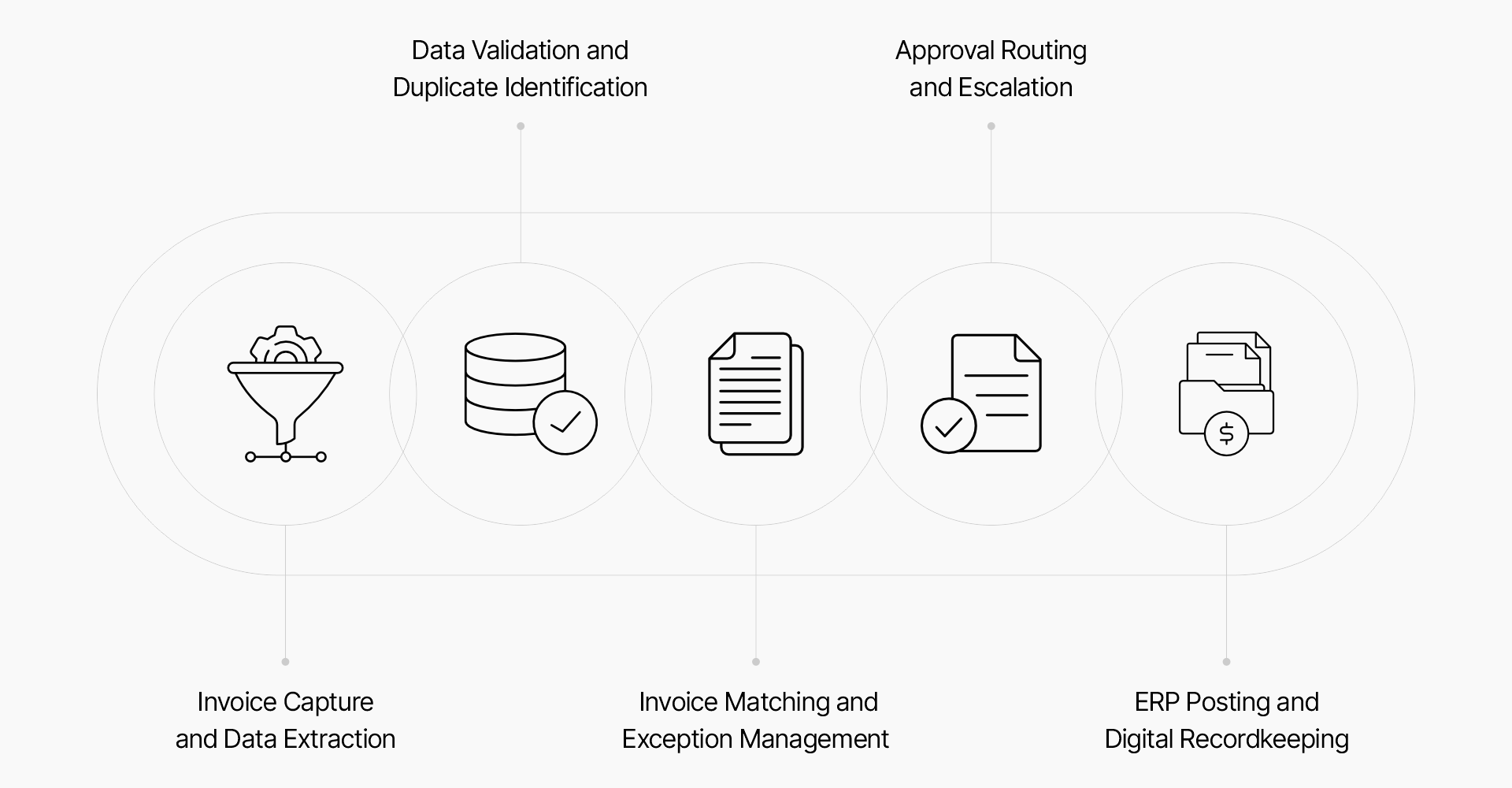
Automated invoice processing follows a connected sequence. Each stage creates data or evidence for the next stage.
-
Invoice Capture and Data Extraction
Invoices are collected from approved channels. These can include email, portals, scanned documents, cloud folders, SFTP locations, and structured e-invoice networks.
OCR and document intelligence identify invoice content. They extract header fields, line items, tax details, payment information, and document relationships.
Modern systems can process structured and unstructured formats. These may include PDF, image, spreadsheet, XML, JSON, EDI, and scanned paper documents.
-
Data Validation and Duplicate Identification
Extracted information is checked for completeness, format, and consistency.
Validation can include:
- Required field checks
- Mathematical checks
- Supplier status verification
- Tax identification validation
- Currency and payment-term checks
- Bank account comparison
- Invoice date and period checks
- Duplicate invoice detection
Duplicate controls should examine more than the invoice number. They can compare supplier, date, amount, currency, purchase order, and payment reference combinations.
-
Invoice Matching and Exception Management
Purchase order invoices are compared with related business records. Depending on the process, this may involve:
- Two-way matching between the invoice and purchase order
- Three-way matching between the invoice, purchase order, and goods receipt
- Multi-document matching against contracts, statements of work, service records, or vendor data
The system applies defined tolerances. An invoice within tolerance can continue. A price, quantity, tax, or receipt discrepancy creates an exception.
Good exception management provides the reviewer with the invoice, related records, failed rule, variance, and required action. This reduces investigation time.
-
Approval Routing and Escalation
Invoices are routed according to entity, department, supplier, amount, purchase category, cost center, or exception type.
Approval rules can enforce:
- Delegated authority limits
- Sequential or parallel approval
- Separation of duties
- Alternate approvers
- Escalation periods
- High-risk payment review
- Approval evidence retention
The system records who reviewed the invoice, what decision was made, and when the action occurred.
-
ERP Posting and Digital Recordkeeping
After validation and approval, invoice data is transferred to the ERP or accounting system. Posting may include the supplier, invoice reference, general ledger code, tax treatment, cost center, payment terms, and supporting documents.
The invoice and its processing history are stored digitally. This creates a searchable record containing source documents, validation results, matching evidence, approvals, exceptions, and posting status.
What Are the 10 Benefits of Automated Invoice Processing?
The benefits of automated invoice processing extend beyond replacing manual data entry. A connected invoice workflow affects processing costs, working capital, payment control, supplier communication, compliance, and financial reporting.
The following practical examples are illustrative. Actual results will depend on invoice volume, process complexity, data quality, system configuration, and the percentage of invoices requiring human review.
-
Faster Invoice Processing and Approvals
Manual processing involves several disconnected activities. AP employees collect invoices, enter data, locate purchase orders, verify receipts, identify approvers, send reminders, and update invoice status. Each handoff adds time to the processing cycle.
Automation connects these activities within one workflow. Invoice data is captured when the document arrives. Validation and matching rules are then applied. An invoice that meets the defined requirements can move directly to the correct approver or ERP posting stage.
Approvers receive the invoice with relevant information, including:
- Supplier details
- Invoice amount and due date
- Purchase order
- Goods receipt
- Matching results
- Exception details
- Previous approval actions
- Supporting documents
This reduces the need to search through emails, folders, or separate financial systems.
Practical example: A company receives 8,000 invoices each month. Under its manual process, invoices take an average of nine days to move from receipt to approved posting. Automated capture, matching, and approval routing reduce the average cycle to three days. Finance can record liabilities six days earlier and has more time to resolve discrepancies before payment dates.
Faster processing helps finance teams:
- Record liabilities earlier
- Reduce pending invoice backlogs
- Complete approvals before due dates
- Resolve exceptions before payment
- Reduce urgent payment requests
- Shorten month-end cut-off activities
The benefit is not limited to speed. A shorter and more consistent cycle also gives finance teams greater control over when liabilities are recorded and payments are authorized.
-
Fewer Data Errors and Exceptions
Manual entry can introduce errors in invoice numbers, supplier codes, dates, quantities, tax values, currency, account codes, and payment terms. These errors may cause matching failures, incorrect postings, duplicate payments, or supplier disputes.
Automated extraction captures invoice information and applies validation before the transaction moves forward. The system can compare extracted data with supplier records, purchase orders, goods receipts, contracts, and previous invoices.
Validation may include:
- Required-field checks
- Invoice total calculations
- Tax calculation checks
- Supplier status verification
- Currency validation
- Purchase order comparison
- Duplicate invoice checks
- Bank detail comparison
- Payment-term verification
Automation does not eliminate all exceptions. Legitimate differences can still arise from partial deliveries, price changes, incorrect tax treatment, missing receipts, or contract amendments. The benefit is that these exceptions are identified earlier and assigned to the appropriate reviewer with the relevant evidence.
Practical example: An AP team processes 10,000 invoices per month. Under manual processing, 1,600 invoices require correction, producing an exception rate of 16%. After automated extraction and validation are introduced, only 700 invoices require review. The exception rate falls to 7%.
The system also classifies the remaining exceptions. Analysis shows that 45% result from missing goods receipts. Finance can then work with receiving teams to address the source of the problem instead of repeatedly correcting invoices.
-
Lower Cost per Invoice
A major invoice automation benefit is the reduction in the total cost required to process each invoice. This cost includes more than AP salaries. It can also include system expenses, outsourced processing, paper storage, administrative overhead, error correction, approval follow-ups, and audit preparation.
Automation reduces the manual effort required at several stages:
- Invoice collection and sorting
- Data entry
- Document classification
- Validation
- Duplicate checking
- Purchase order matching
- Approval follow-ups
- ERP posting
- Document retrieval
- Audit evidence collection
Finance teams should calculate cost per invoice before and after implementation using the same cost categories.
Calculation:
Total invoice processing cost ÷ Number of invoices processed
Practical example: A business spends £120,000 each year processing 20,000 invoices. Its average cost is £6 per invoice. After automation, annual processing costs fall to £70,000 while volume increases to 25,000 invoices. The average cost declines to £2.80 per invoice.
Before automation:
£120,000 ÷ 20,000 invoices = £6 per invoice
After automation:
£70,000 ÷ 25,000 invoices = £2.80 per invoice
The company processes 25% more invoices while reducing its unit cost by more than half. This is a more useful measure than reviewing total AP spending alone because it accounts for changes in volume.
-
Greater Finance Team Productivity
Manual invoice activities can occupy a large portion of an AP employee’s working day. Employees may repeatedly download attachments, copy information between systems, search for missing documents, update spreadsheets, and contact approvers.
Automation allows finance professionals to concentrate on activities that require financial knowledge and judgment. These include:
- Resolving complex exceptions
- Reviewing supplier account issues
- Planning payment schedules
- Monitoring financial controls
- Correcting vendor data
- Supporting month-end close
- Examining spend patterns
- Reviewing process performance
- Managing supplier queries
- Investigating payment risks
Productivity should not be measured only through headcount reduction. A better measure is the number of invoices processed per employee while maintaining accuracy, control, and reasonable workloads.
Practical example: A five-person AP team processes 10,000 invoices per month, equal to 2,000 invoices per employee. Following automation, the same team processes 17,500 invoices, equal to 3,500 invoices per employee.
Calculation:
17,500 invoices ÷ 5 employees = 3,500 invoices per employee
The team increases processing capacity by 75% without adding positions. Employees also spend less time on data entry and more time reviewing exceptions, supplier balances, and payment priorities.
Finance leaders should assess productivity together with overtime, error rates, exception aging, and employee workload. Higher output should not weaken processing quality.
-
Better Invoice and Spend Visibility
Invoices stored across individual inboxes, paper files, shared folders, and ERP queues provide an incomplete view of upcoming liabilities. Finance teams may know what has been posted but lack visibility into invoices that have arrived and are still awaiting validation or approval.
Automated processing centralizes invoice data from receipt onward. Dashboards can show:
- Invoices received but not yet posted
- Invoices awaiting approval
- Exceptions by type and owner
- Invoice values by supplier or entity
- Upcoming payment obligations
- Overdue invoices
- Unused discount opportunities
- Duplicate or high-risk submissions
- Average processing times
- Unresolved exceptions by age
This information supports cash forecasting, accrual calculation, supplier analysis, and month-end management.
Practical example: A controller preparing monthly accruals identifies £650,000 in received invoices that have not yet been posted. Of this amount, £420,000 is awaiting approval, £150,000 has matching exceptions, and £80,000 is ready for posting.
Instead of estimating the entire liability from historical spending, the controller can use invoice-level data to prepare a more accurate accrual. Managers can also contact the departments responsible for the £420,000 approval backlog.
Visibility should extend beyond status reporting. Finance teams should be able to trace why an invoice is delayed, who owns the next action, and how long it has remained at each processing stage.
-
Improved Cash Flow and Early-Payment Discount Capture
Slow invoice processing reduces the time available for payment planning. By the time an invoice is approved, the payment may already be due. This can result in urgent payments, late fees, missed discounts, or poor control over cash outflows.
Automation gives AP and treasury teams earlier visibility into approved and pending liabilities. They can schedule payments according to:
- Contractual due dates
- Available cash
- Early-payment discounts
- Supplier priority
- Payment method
- Currency requirements
- Disputed invoice status
- Working capital objectives
This allows businesses to make deliberate payment decisions. It can prevent both late payments and unnecessarily early payments.
Practical example: A supplier offers a 2% discount when a £100,000 invoice is paid within 10 days. The standard payment term is 30 days. Under the manual process, approval takes 14 days, so the company misses the £2,000 discount.
After automation, the invoice is captured, matched, and approved within four days. Treasury can compare the £2,000 saving with the cost of paying 20 days earlier and decide whether taking the discount is financially appropriate.
Finance teams should measure the value captured, not only the number of discounts taken. They should also record why discounts were missed, such as late receipt, missing goods receipts, approval delays, insufficient cash, or incorrect supplier terms.
-
Stronger Supplier Relationships
Suppliers expect confirmation that invoices have been received, reviewed, and scheduled for payment. Fragmented processing makes it difficult for AP teams to provide accurate answers.
A centralized workflow gives employees access to the current invoice status, exception reason, approval owner, and expected payment date. Supplier inquiries can be answered using recorded information instead of searching through multiple inboxes.
Faster exception routing also reduces disputes related to:
- Incorrect quantities
- Price differences
- Missing receipts
- Tax treatment
- Duplicate submissions
- Contract terms
- Payment dates
- Credit notes
Practical example: A supplier contacts AP regarding three unpaid invoices. Under the previous process, an employee would need to search emails and contact several departments.
With centralized processing, AP can confirm that one invoice is approved for payment, one has a quantity variance assigned to receiving, and one is a duplicate submission. The supplier receives a clear response without waiting for several internal updates.
More consistent processing can contribute to:
- Fewer status inquiries
- Shorter dispute periods
- More predictable payments
- Better payment-term negotiations
- Lower supply interruption risk
- More accurate supplier records
Supplier performance can also be assessed more fairly. Finance teams can distinguish supplier-caused issues from internal approval or receiving delays.
-
Audit-Ready Compliance and Recordkeeping
Manual processes often distribute invoice evidence across emails, paper files, shared folders, and financial systems. During an audit, employees must reconstruct the transaction history by locating documents and requesting information from approvers.
Automated workflows retain invoice activity within a connected record. The audit history can show:
- When and how the invoice was received
- Which data fields were extracted
- What validation checks were completed
- Which purchase orders or contracts were matched
- What exceptions were identified
- Who reviewed and approved the invoice
- Whether invoice data was changed
- When the transaction was posted
- Which user completed each action
- What payment reference was created
This supports internal audits, statutory audits, tax reviews, control testing, and policy compliance.
Practical example: An auditor selects a £75,000 service invoice for review. Finance retrieves the original invoice, supplier record, contract, matching result, approval history, change log, ERP posting reference, and payment confirmation from one digital record.
The evidence shows that the invoice exceeded the standard approval threshold and received the required second approval. The audit request can be completed without reconstructing the transaction from emails.
Consistent records also support separation of duties. Finance teams can confirm that the employees who created, reviewed, approved, and paid a transaction held the appropriate permissions.
-
Reduced Fraud and Payment Risk
Invoice fraud can involve fabricated suppliers, altered bank details, duplicate invoices, inflated quantities, unauthorized purchases, or manipulated approval routes. Manual review may apply controls inconsistently, particularly during high-volume periods.
Automation applies defined checks to each invoice. These checks can compare invoice information with supplier records, purchase orders, contracts, receipts, bank details, previous invoices, and approval policies.
Indicators that may require further review include:
- A new or recently reactivated supplier
- Recently changed bank information
- Duplicate invoice numbers or amounts
- An invoice just below an approval threshold
- Several invoices submitted within a short period
- Missing purchase orders
- Unusual quantities or values
- Payments requested to a new country
- Transactions outside normal supplier patterns
- Split invoices related to the same purchase
Practical example: A supplier invoice requests payment to a bank account that differs from the approved vendor record. The invoice amount and purchase order match, but the bank comparison fails.
The system places the invoice on hold and routes it for independent verification. AP confirms the change directly with an authorized supplier contact before updating the vendor record or releasing payment.
Without this control, an invoice could pass matching because its amount and purchase order were correct. This example shows why payment details must be checked separately from commercial information.
Automation supports fraud and payment risk management, but it cannot replace supplier onboarding controls, independent bank verification, access reviews, payment authorization, and employee oversight.
-
Higher Invoice Volumes Without Proportional AP Headcount Growth
In a manual process, higher invoice volumes usually create more data entry, matching work, approval follow-ups, and filing. Businesses may respond by hiring more employees or accepting larger backlogs.
Automated processing changes this relationship. Routine invoices that meet defined rules can proceed with limited intervention. AP employees focus on invoices that contain missing information, matching differences, policy conflicts, or risk indicators.
This capability is particularly valuable during:
- Business expansion
- Seasonal purchasing periods
- Acquisitions
- Shared-service growth
- New entity onboarding
- Supplier network expansion
- Centralization of regional AP teams
- Sudden increases in transaction volume
Practical example: A retailer processes 15,000 invoices per month with six AP employees. During the holiday purchasing period, volume increases to 24,000 invoices.
Under a manual model, the retailer may need temporary employees or overtime to manage the 60% increase. With automation, 70% of invoices pass through extraction, validation, matching, and approval without manual processing. The existing team concentrates on the remaining 30% that require review.
The organization accommodates the seasonal increase without a proportional rise in headcount. Processing capacity increases while exception ownership remains with experienced employees.
Scalability should still be tested before wider deployment. Finance and IT teams should confirm:
- Maximum document volumes
- Processing performance during peak periods
- ERP integration capacity
- Exception queue limits
- Data storage requirements
- System availability
- User access requirements
- Recovery procedures
The objective is not simply to process more invoices. It is to increase capacity while preserving validation accuracy, approval discipline, payment security, and complete transaction records.
See how invoice automation can improve your AP workflow
Collatio captures invoice data, checks for duplicates, matches invoices with purchase orders and receipts, and routes exceptions to the right reviewer. See how your team can reduce manual work while maintaining control over approvals and ERP posting.
Book a DemoHow Can Finance Teams Measure the Value of Invoice Processing Automation?
Finance teams should compare performance before and after automation using the same invoice types, entities, and reporting periods. A baseline makes it easier to identify measurable changes in processing speed, cost, accuracy, and team capacity.
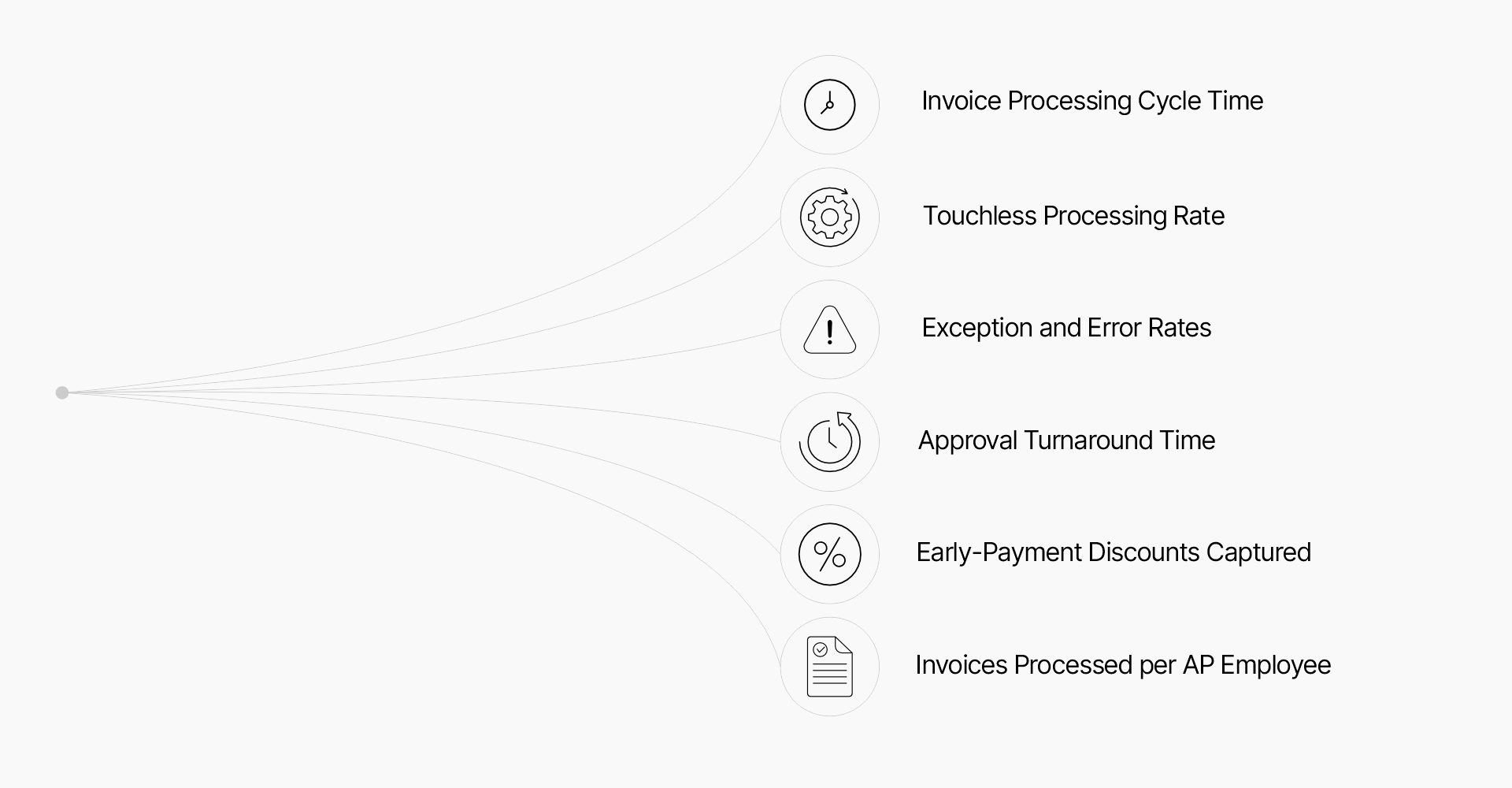
The following examples are illustrative.
-
Invoice Processing Cycle Time
Measure the time between invoice receipt and approved ERP posting. Track the average, median, and longest cycle times. Report standard invoices separately from invoices with exceptions.
Practical example: A finance team takes an average of eight days to process an invoice before automation. After implementation, the average falls to three days. The business has reduced its invoice cycle time by 62.5%.
Calculation:
(8 days − 3 days) ÷ 8 days × 100 = 62.5% reduction
-
Touchless Processing Rate
The touchless processing rate is the percentage of invoices completed without manual data entry, matching, or approval intervention.
Practical example: A company processes 10,000 invoices per month. If 6,500 invoices pass extraction, validation, matching, and posting rules without intervention, the touchless processing rate is 65%.
Calculation:
6,500 touchless invoices ÷ 10,000 total invoices × 100 = 65%
Finance teams should review this metric with exception and error rates. A high touchless rate has limited value if incorrect invoices pass through the workflow.
-
Exception and Error Rates
Measure the percentage of invoices that fail extraction, validation, matching, posting, or payment checks. Classify each exception by its cause.
Categories can include missing purchase orders, price differences, absent goods receipts, incorrect tax, duplicate submissions, and incomplete supplier data.
Practical example: Before automation, 1,800 of 10,000 monthly invoices require correction. After automation, only 700 require review. The exception rate has declined from 18% to 7%.
Calculation:
700 exception invoices ÷ 10,000 total invoices × 100 = 7%
This classification can also reveal process problems. For example, if 40% of exceptions result from missing goods receipts, the issue may sit with receiving procedures rather than invoice extraction.
-
Approval Turnaround Time
Measure the time between routing an invoice for approval and receiving the final decision. Report delays by entity, department, approval level, and approver group.
Practical example: Invoices previously remained with approvers for an average of four days. Automated routing, reminders, and escalation reduce this period to one day. Approval turnaround time has decreased by 75%.
Calculation:
(4 days − 1 day) ÷ 4 days × 100 = 75% reduction
Department-level reporting may show that most invoices are approved within one day, while one business unit takes five days. Finance can then address the specific approval bottleneck.
-
Early-Payment Discounts Captured
Compare the total value of available discounts with the amount actually captured. Record why eligible discounts were missed.
Practical example: Suppliers offer £20,000 in early-payment discounts during a quarter. The company captures £15,000 after automation, compared with £6,000 previously. Its discount capture rate has increased from 30% to 75%.
Calculation:
£15,000 captured ÷ £20,000 available × 100 = 75%
Missed discounts should be classified by cause, such as late invoice receipt, unresolved matching issues, delayed approval, or cash availability.
-
Invoices Processed per AP Employee
Divide the total number of invoices processed during a period by the number of full-time AP employees involved in invoice processing.
Practical example: A six-person AP team previously processed 12,000 invoices per month, or 2,000 invoices per employee. After automation, the same team processes 21,000 invoices, or 3,500 invoices per employee.
Calculation:
21,000 invoices ÷ 6 AP employees = 3,500 invoices per employee
This represents a 75% increase in processing capacity without additional AP headcount. Finance teams should review the result alongside overtime, exception rates, and payment accuracy to confirm that higher output has not weakened process control.
A balanced KPI framework should also track cost per invoice, duplicate payment rate, on-time payment rate, unposted invoice value, and the age of unresolved exceptions. Together, these measures provide a clearer view of the financial and operational value created by invoice processing automation.
What Should Finance Teams Look for in an Automated Invoice Processing System?
Finance teams should evaluate an invoice processing system against their actual document volumes, approval policies, financial controls, invoice complexity, and integration requirements. Product demonstrations should use real invoice samples and exception scenarios rather than standard vendor templates.
-
Support for Multiple Invoice Formats and Intake Channels
The system must process the formats suppliers currently use, including PDFs, scanned images, spreadsheets, XML files, email attachments, portal submissions, and e-invoices. It should centralize these inputs and identify invoices submitted through more than one channel.
Example: A supplier sends an invoice by email and later uploads the same document through a portal. The system compares the supplier, invoice number, date, currency, and amount. It flags the second submission as a possible duplicate before payment.
-
Configurable Matching and Approval Rules
Finance teams need control over matching tolerances, approval thresholds, exception categories, escalation periods, and routing conditions. Rules may vary by legal entity, supplier, invoice value, purchase category, document type, and risk level.
Example: A manufacturer allows a 2% price variance for packaging materials but requires an exact match for professional service invoices. The system applies the correct tolerance based on the purchase category. Invoices outside the permitted range are assigned to the relevant reviewer.
-
ERP and Financial System Compatibility
The selected system must exchange data reliably with existing ERP, accounting, procurement, and payment systems. This exchange may include vendor records, purchase orders, goods receipts, account codes, approval decisions, invoice data, and posting confirmations.
Finance teams should verify:
- Available integration methods
- Data synchronization frequency
- Field-mapping requirements
- Integration error handling
- Posting confirmation
- Duplicate prevention
- Connection monitoring
- Responsibilities for future upgrades
Example: An approved invoice is sent to the ERP with its supplier code, general ledger account, cost center, tax code, currency, and payment terms. If posting fails because the cost center is inactive, the system returns a clear error and routes the invoice to the responsible finance employee.
-
Security and Access Controls
The system should provide role-based permissions, secure authentication, encryption, activity logs, and separation of duties. Employees should only be able to access or change information required for their roles.
Changes to supplier records, invoice values, bank details, approval rules, and payment information must be recorded with the user identity, timestamp, and previous value.
Example: An AP employee can enter or review an invoice but cannot approve a payment above an assigned limit. A bank account change requires separate verification and approval by an authorized employee. Both actions remain visible in the audit history.
-
Multi-Entity, Multi-Currency, and Tax Support
Businesses operating across regions need separate rules for legal entities, currencies, tax jurisdictions, approval hierarchies, and accounting structures. The system should maintain entity-level control while supporting consolidated reporting.
Example: A group receives invoices in US dollars, British pounds, euros, and UAE dirhams. The system assigns each invoice to the correct entity, applies the relevant tax treatment, uses approved exchange-rate data, and routes the document through that entity’s approval structure.
-
Reporting and Audit Trails
Reporting must provide visibility into invoice status, cycle times, exception causes, approver activity, processing costs, supplier patterns, and control failures.
Every invoice should have a searchable history connecting the source document with extracted data, validation results, matched records, exceptions, approvals, changes, and ERP posting status.
Example: During an audit, a reviewer selects an invoice and retrieves its purchase order, goods receipt, matching result, approval history, posting reference, and payment status from one record. Finance does not need to collect evidence from separate inboxes and folders.
-
Industry-Specific Configuration
Invoice structures and control requirements differ across industries. Finance teams should confirm that the system can manage relevant contracts, supporting documents, compliance checks, tax rules, and matching methods without extensive custom development.
Example: A construction company may need to compare invoices with contracts, project milestones, retention amounts, and progress certificates. A manufacturer may require three-way matching against purchase orders and goods receipts. The system should support each process through configurable rules and document relationships.
How Can Businesses Implement Automated Invoice Processing?
Businesses can implement automated invoice processing through a structured seven-step approach. The process should begin with workflow assessment and data preparation. Automating inconsistent policies or inaccurate data can increase exceptions and processing risks.
Step 1: Assess the Existing Invoice Workflow
Document the complete invoice process, including:
- Invoice intake channels
- Manual data-entry activities
- Validation and matching procedures
- Approval routes
- Common exception types
- ERP handoffs
- Payment dependencies
Measure current cycle times, processing costs, manual effort, error rates, and approval delays. This assessment establishes the baseline for evaluating future results.
Step 2: Define Automation Goals and Performance Metrics
Set measurable targets based on the organization’s operational and financial priorities.
Relevant metrics may include:
- Invoice processing cycle time
- Cost per invoice
- Touchless processing rate
- Exception rate
- Approval turnaround time
- Invoices processed per employee
- Early-payment discounts captured
For example, a company focused on working capital may prioritize faster approvals and higher discount capture. A shared-service center may focus on lowering processing costs and increasing invoice capacity.
Step 3: Prepare Vendor, Purchase Order, and ERP Data
Review the reference data required for extraction, validation, matching, and posting. This includes:
- Supplier names and identification numbers
- Tax and bank information
- Payment terms
- Purchase orders
- Goods receipts
- General ledger accounts
- Cost centers
- Employee approval hierarchies
Remove duplicate records and correct missing or outdated information. Poor data quality can produce validation failures even when processing rules are correctly configured.
Step 4: Configure Validation and Approval Policies
Translate existing financial controls into documented system rules. Define:
- Required invoice fields
- Duplicate checks
- Matching methods and tolerances
- Approval limits
- Exception ownership
- Escalation periods
- ERP posting requirements
- High-risk invoice controls
Finance, procurement, tax, treasury, IT, and internal control teams should review the rules relevant to their responsibilities.
Step 5: Test the Process With a Controlled Invoice Group
Begin with a pilot that has sufficient volume to generate reliable findings but limited operational risk.
The pilot should include standard invoices and difficult scenarios, such as:
- Duplicate submissions
- Missing purchase orders
- Price and quantity variances
- Incorrect tax calculations
- Credit notes
- Changed bank details
- Missing goods receipts
- Line-item discrepancies
Compare pilot results with the original baseline. Review extraction accuracy, processing speed, exception quality, approval performance, and ERP posting results.
Step 6: Train Finance Teams and Assign Exception Ownership
Employees should understand how invoices move through the process, why validation rules fail, and what evidence is required to resolve each exception.
Training should cover:
- Reviewer responsibilities
- Approval deadlines
- Exception categories
- Escalation routes
- Access permissions
- Reporting requirements
- Control procedures
Each exception type should have a named owner. Clear ownership prevents invoices from remaining unresolved between AP, procurement, receiving, and business departments.
For related operational guidance, review these AP invoice processing best practices.
Step 7: Monitor Performance and Refine Processing Rules
Review system performance after deployment. Monitor extraction errors, false exceptions, approval delays, integration failures, supplier submission issues, and posting errors.
Compare actual results with the targets established during Step 2. Any rule adjustment should follow a controlled process that includes documentation, testing, approval, and post-change monitoring. This approach helps maintain processing accuracy as invoice volumes, suppliers, and business requirements change.
Building a Faster and More Controlled Invoice Process
The benefits of automated invoice processing extend across AP operations, cash management, compliance, supplier relationships, and financial reporting. However, faster processing alone is not enough. Finance teams also need reliable validation, consistent approvals, clear exception ownership, and complete audit records.
An effective process automates predictable invoices while preserving human review for ambiguous, unusual, or high-risk transactions. This balance helps businesses process higher invoice volumes without weakening financial control.
Collatio automated invoice processing software supports this approach by capturing invoices from multiple channels, validating header and line-item data, identifying duplicates, and performing two-way, three-way, or six-way matching. Valid invoices proceed through controlled approval and ERP workflows, while exceptions are routed to the appropriate reviewer with supporting evidence.
Explore Collatio to build an invoice process that reduces manual effort, improves processing visibility, and maintains control from invoice receipt through ERP posting.